Flat File
AMI provides a large number of datasource adapters for different supported software. Alternatively, users may choose to attach flat files directly using this highly performant adapter.
Overview
The AMI Flat File Reader datasource adapter is a highly configurable adapter for processing extremely large files efficiently.
When creating datamodels using the flat files, AMI determines how to parse and store the data using a number of general directives.
Generally, the adapter can handle files containing data that have the following format:
-
Delimited lists or ordered fields:
-
Key-value pairs:
-
Pattern matching:
Alternatively you can display the entire raw contents of a file in a single-column AMI table with the heading 'line'.
When creating a datamodel, AMI will default to auto-generating a raw table if it cannot automatically detect any mappings, or the user does not supply them.
Using the Adapter
Navigate to the AMI Data Modeler (Dashboard -> Data Modeler) and select "Attach Datasource".
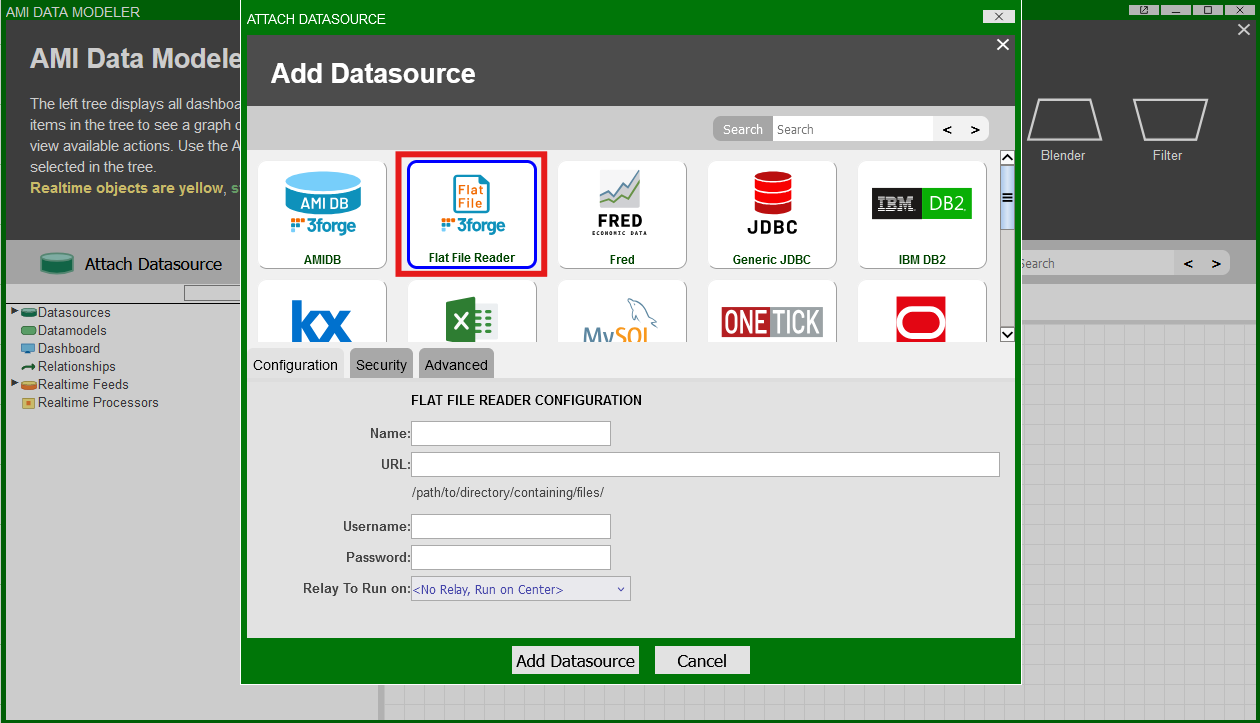
Under the "Configuration" menu, fill in the following details:
-
Name:
- Supply a user-defined name, e.g "RawFiles"
-
URL:
- The full path to the directory containing your files
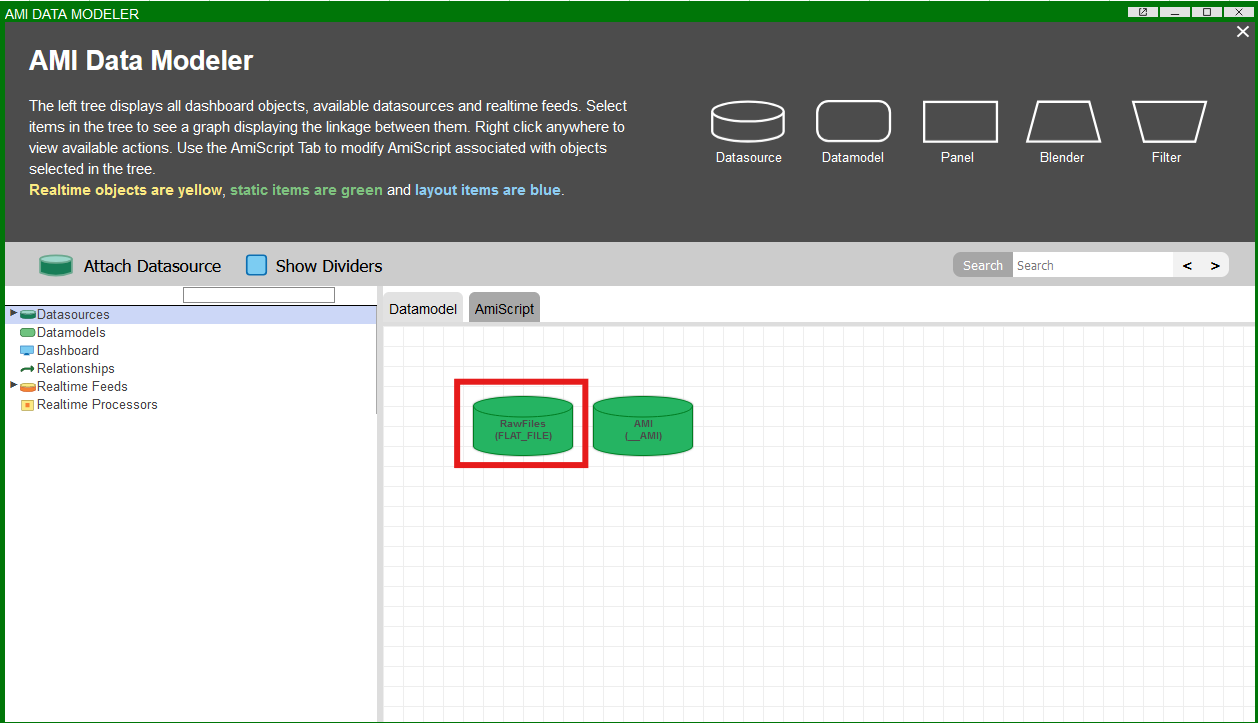
Then click the "Add Datasource" button. The flat file datasource will now be available and visible in the Data Modeler:
Note
Files can also be accessed remotely via AMI Relay on machines where a Relay has been installed.
When configuring the flat file reader, click the "Relay To Run on" dropdown menu and select the corresponding Relay.
General Directives
These are the main directives that are used to parse raw files when creating a datamodel from the adapter:
_file_fields_delim_conflateDelim(optional)_quote(optional)_equals(optional, key-value pairs)_escape(optional)_mappings(optional, key-value pairs)_binary(optional)_pattern(pattern-matching only)
See the section below for syntax to configure each directive.
By default, AMI will attempt to create a single-column table with the raw data if it cannot automatically parse the data.
In the datamodel creation wizard, it looks like this:
_file
-
Example:
_file="path/to/file.type"- The file to read including file type
_fields
-
Syntax:
_fields="col1_type col1, col2_type col2, ..."-
Type and name of the columns to be stored as a table in AMI. Allowed types are:
StringLongIntegerDoubleFloatBooleanUTC
-
If column type is not supplied, defaults to
String
-
Note
Line numbers are added automatically by AMI via the _linenum directive. If the line number column is not supplied, it will default to type integer and be added to the end of the table schema.
Columns defined in the _pattern but not defined in _fields will be added to the end of the table schema.
_delim
-
Syntax:
_delim="delimiter"- String used by AMI to separate each field
- Special characters like tabs and line breaks can be supplied as the following:
"\t""\n"
_conflateDelim
-
Syntax:
_conflateDelim=true_or_false- If true, then one or more consecutive delimiters is treated as a single delimiter
_quote
-
Syntax:
_quote="quote_character"- Optional character denoting a quote in the supplied file
- If AMI encounters fields enclosed in the quotes, they will be parsed without in the final table
_equals
-
Syntax:
_equals="equals_char"- Supplied equality symbol for key-value pair mapping
_escape
-
Syntax:
_escape="escape_char"- Supplied escape character
_mappings
-
Syntax:
_mappings=from1=to1,from2=to2,...- Optional mappings directive for key-value pair files
- Used for key names that are not valid field names
- Used if multiple key names should be attributed to the same column heading
- For multiple column-to-pattern mappings, use \n (new line) to separate each one
_binary
-
Syntax
_binary=true/false- Indicates whether the file contains binary data
_pattern
-
Syntax:
_pattern=col1_type col1_name, ...=regex_describing_columns,_pattern=col1_name, ...=regex_describing_columns(if column typing is specified in_fields)- Used for files with data that aren't stored in a conventional format
- Uses regex for pattern matching
Optional Line Directives
_skipLines
-
Syntax:
_skipLines=number_of_lines- Number of lines to skip from the top of the file, for example if there is a header
- Default is 0
_linenum
-
Syntax:
_linenum=column_name- Name of the column that will contain the line number starting from 1
- If not supplied, default name is "linenum"
- Starting number is inclusive of
_skipLines, i.e starts from_skipLines+1
_filterOut
-
Syntax:
_filterOut=regex- Any line that matches the supplied regular expression will be ignored
- Applied before parsing, so more performant than using the
WHEREclause
Examples:
_filterOut="Test": ignore any lines containing the text "Test"_filterOut="^Comment": ignore any lines starting with "Comment"_filterOut="This|That": ignore any lines containing the text "This" or "That"
_filterIn
-
Syntax:
_filterIn=regex- Only lines that match the supplied regular expression will be considered
- Applied before parsing, so more performant than using the
WHEREclause
Examples:
_filterIn="3forge": ignore any lines that don't contain the word "3forge"._filterIn="^Outgoing": ignore any lines that don't start with "Outgoing"._filterIn="Data(.*)": ignore any lines that don't start with "Data", and only process the text after.
Examples
Delimited List
Sample data:
Directives:
AMI Table:
| linenum (int) | code (string) | lname (string) | age (int) |
|---|---|---|---|
| 1 | 11232-33 | Smith | 20 |
| 2 | 1332|ABC | 30 | |
| 3 | Account|112 | Jones | 18 |
Key-Value Pair
For key-value pairs, the equals character needs to be specified. Mappings can optionally be supplied which will allow for AMI to populate columns according to user-defined mappings.
Sample data:
Directives:
AMI Table:
| linenum (int) | code (string) | lname (string) | age (int) |
|---|---|---|---|
| 1 | 11232-33 | Smith | 20 |
| 2 | 1332|ABC | 30 | |
| 3 | Act|112 | J | 18 |
Pattern Matching
With pattern matching, fields are not strictly required. However, how you specify column names and typing depends on the regex pattern you choose.
To define the types of your columns, it is preferred to do this via the _pattern definition than in the _fields directive otherwise you may encounter type mis-matching. For example:
is equivalent to omitting the _fields directive entirely as the column types are specified in the pattern.
Example 1
Sample data:
Generates the AMI Table:
| linenum (int) | ticker (string) | amount (long) | price (double) |
|---|---|---|---|
| 1 | GOOGL | 1000 | 158.0 |
| 2 | AAPL | 30 | 216.0 |
| 3 | MSFT | 20 | 430.1 |
Example 2
This defines two patterns such that:
Maps to:
| linenum (int) | fname (string) | lname (string) | age (int) | weight(int) |
|---|---|---|---|---|
| 1 | John | Smith | 20 | |
| 2 | Bobby | Boy | 130 |