AMPS
3forge supports AMPS integration in one of two ways:
- AMPS datasource adapter
- AMPS feed handler
This is the page for the AMPS datasource adapter. To set up the feed handler, see this page.
Overview
AMPS messages can be transmitted to and from AMI using the datasource adapter. The datasource adapter is best suited for bi-directional communication such as querying AMPS or sending messages. If you are only interested in receiving real-time messages, the feed-handler may be more suitable.
Note
Datamodels are single-threaded. To streamline an AMPS process where you want to receive real-time data and publish to AMPS simultaneously, it is beneficial to run both the feed-handler and adapter.
Setup
Requirements
- An AMPS server and its connection details
- The AMPS datasource adapter
Please contact us to have the AMPS adapter assigned to your account. Please reach out to support@3forge.com if you do not already have it.
Setting up the Adapter
-
Download and unzip the AMPS
.jarfiles assigned to you from the client portal and add them to your AMI installation'samione/lib/directory. -
Add the following line to your
local.propertiesfile ensuring to reference the existing datasource plugin list ($${ami.datasource.plugins}): -
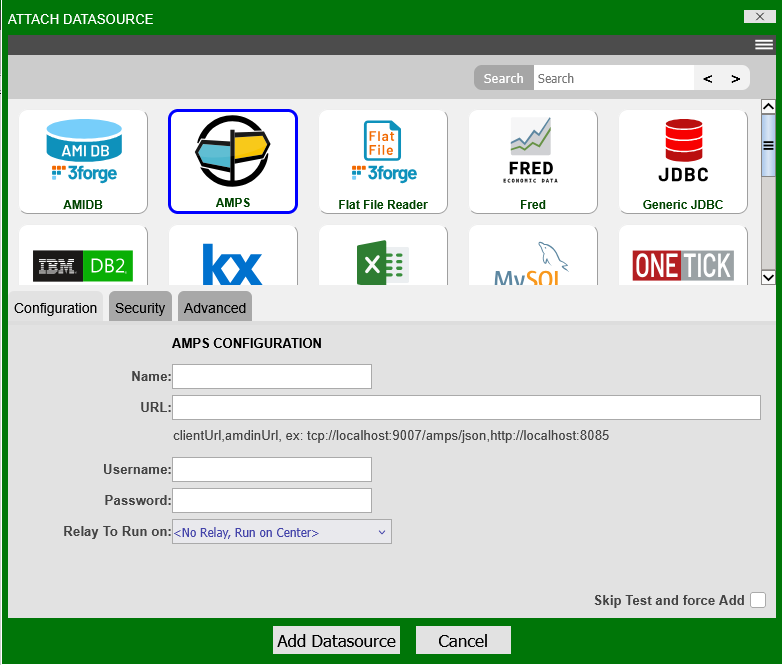
Restart AMI. AMPS should now be available Dashboard -> Data Modeler -> Attach Datasource.
-
Give your AMPS datasource a name and configure the connection details.
Example Commands
These are example commands that can be used within AmiScript blocks, e.g: datamodels, to read/write to AMPS topics.