Redis
AMI supports connection to Redis data stores. Use AMI to send commands to and from a Redis data store for easy integration into your AMI dashboard.
This page contains information on connecting to and using Redis.
Setup
Requirements
- Redis data store and connection details
- Redis adapter
Please contact us at support@3forge.com to get the Redis adapter assigned to your 3forge account.
Setting up the Adapter
-
Unzip the Redis files assigned to you from the client portal and add them to your AMI library in
amione/lib. -
Add the following property to your datasource plugin adapter list in
local.properties: -
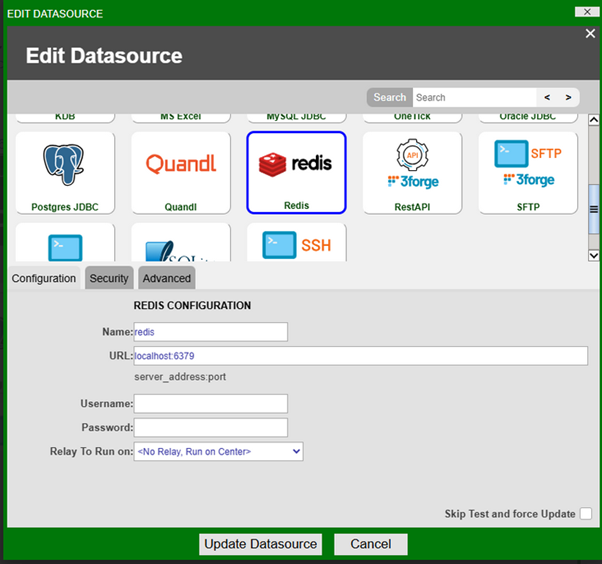
Restart AMI. Redis should now be available under Dashboard -> Data Modeler -> Attach Datasource.
-
Give your Redis Datasource a name and configure the URL. The URL should take the following format:
Redis Commands in AMI
AMI supports several Redis commands. For a full list of the accepted commands and their return-types in AMI, see the list below.
General Redis Command Format
The general structure of a Redis command is as follows:
Where data is attributed to a given key and entries for that key are stored in a key-value pair structure. The key pattern naming convention is as follows:
Example
-
To create a Redis hash with the key
order:1:Field Value order_id1 customer_id101 statusPending amount100.50
Accepted Redis Commands
Redis data is stored as strings. To ensure correct data processing, please be aware of the following:
- Almost every command accepts String as a valid return-type in AMI, but String is not iterable in AMI.
- Some return types depend on the inclusion of optional parameters.
- If a Redis command’s output is a number, then you may use a numeric data-type in AMI Web (int/float/double/byte/short/long).
- String ("OK") or numeric (1/0) means whatever is in the parentheses is the default response if the query executes without error.
- AMI redis adapter’s syntax is case insensitive.
- Arguments in square braces (
[]) are optional. - Arguments delimited by pipes (
|) mean either/or option can be chosen.
| Command Name | Arguments | Accepted AMI Return Types | Description |
|---|---|---|---|
APPEND |
key value |
Appends a string to the value of a key | |
AUTH |
[username] password |
Authenticates the connection | |
BITCOUNT |
key [start end [BYTE | BIT]] |
Counts the number of set bits in a string | |
BITOP |
operation destkey key [key ...] |
Performs bitwise operations. Operations are AND OR XOR NOT | |
BITPOS |
key bit [start [end [BYTE | BIT]]] |
Finds the first set or clear bit in a string | |
BLMOVE |
source destination LEFT | RIGHT LEFT | RIGHT timeout |
Pops an element from a list, pushes it to another list and returns it | |
BLPOP |
key [key ...] timeout |
Removes and returns the first element in a list | |
BRPOP |
key [key ...] timeout |
Removes and returns the last element in a list | |
BZPOPMAX |
key [key ...] timeout |
Removes and returns the member with the highest score from one or more sorted sets | |
BZPOPMIN |
key [key ...] timeout |
Removes and returns the member with the lowest score from one or more sorted sets | |
COPY |
source destination [DB destination-db] [REPLACE] |
Copies the value of a key to a new key | |
DBSIZE |
Returns the number of keys in the currently-selected database | ||
DECR |
key |
Decrements the integer value of a key by one | |
DECRBY |
key decrement |
Decrements the integer value of a key by the supplied decrement | |
DEL |
key [key ...] |
Deletes one or more keys | |
DUMP |
key |
Returns a serialized representation of the value stored at a key (logging will not display content, it will say "x bytes") | |
ECHO |
message |
Returns the given string | |
EVAL |
script numkeys [key [key ...]] [arg [arg ...]] |
Executes a server-side Lua script | |
EXISTS |
key [key ...] |
Determines whether one or more keys exist | |
EXPIRE |
key seconds [NX | XX | GT | LT] |
Sets the expiration time of a key in seconds | |
EXPIREAT |
key unix-time-seconds [NX | XX | GT | LT] |
Sets the expiration time of a key to a Unix timestamp | |
EXPIRETIME |
key |
Returns the expiration time of a key as a Unix timestamp | |
FLUSHALL |
Removes all keys from all databases | ||
FLUSHDB |
[ASYNC | SYNC] |
Removes all keys from current database | |
GEOADD |
key [NX | XX] [CH] longitude latitude member [longitude latitude member ...] |
Adds one or more members to a geospatial index | |
GEODIST |
key member1 member2 [M | KM | FT | MI] |
Returns the distance between two members of a geospatial index | |
GEOHASH |
key member [member ...] |
Returns members from from a geospatial index as geohash strings | |
GEOPOS |
key member [member ...] |
Returns the longitude and latitude of members from a geospatial index | |
GEOSEARCH |
key FROMMEMBER member | FROMLONLAT longitude latitude BYRADIUS radius M | KM | FT | MI | BYBOX width height M | KM | FT | MI [ASC | DESC] [COUNT count [ANY]] [WITHCOORD] [WITHDIST] [WITHHASH] |
Queries a geospatial index for members inside an area of a box or a circle | |
GEOSEARCHSTORE |
destination source FROMMEMBER member | FROMLONLAT longitude latitude BYRADIUS radius M | KM | FT | MI | BYBOX width height M | KM | FT | MI [ASC | DESC] [COUNT count [ANY]] [STOREDIST] |
As geosearch but can optionally store the result | |
GET |
key |
Returns the string value of a key | |
GETDEL |
key |
Returns the string value of a key after deleting it | |
GETEX |
key [EX seconds | PX milliseconds | EXAT unix-time-seconds | PXAT unix-time-milliseconds | PERSIST] |
Returns the string value of a key after setting its expiration time | |
GETRANGE |
key start end |
Returns a substring of the string stored at a key | |
HDEL |
key field [field ...] |
Deletes one or more fields and their values from a hash. Deletes the hash if no fields remain | |
HEXISTS |
key field |
Determines whether a field exists in a hash | |
HGET |
key field |
Returns the value of a field in a hash | |
HGETALL |
key |
Returns all fields and values in a hash | |
HINCRBY |
key field increment |
Increments the integer value of a field in a hash by a number | |
HINCRBYFLOAT |
key field increment |
Increments the floating point value of a field in a hash by a number | |
HKEYS |
key |
Returns all fields in a hash | |
HLEN |
key |
Returns the number of fields in a hash | |
HMGET |
key field [field ...] |
Returns the values of all fields in a hash | |
HMSET |
key field value [field value ...] |
Sets the values of multiple fields | |
HRANDFIELD |
key [count [WITHVALUES]] |
COUNT)COUNT) |
Returns one or more random fields from a hash |
HSCAN |
key cursor [MATCH pattern] [COUNT count] |
Iterates over fields and values of a hash | |
HSET |
key field value [field value ...] |
Creates or modifies the value of a field in a hash | |
HSETNX |
key field value |
Sets the value of a field in a hash only when the field doesn't exist | |
HSTRLEN |
key field |
Returns the length of the value of a field | |
HVALS |
key |
Returns all values in a hash | |
INCR |
key |
Increments the integer value of a key by one | |
INCRBY |
key increment |
Increments the integer value of a key by a number | |
INCRBYFLOAT |
key increment |
Increments the floating point value of a key by a number | |
INFO |
[section [section ...]] |
Returns information and statistics about the server | |
KEYS |
pattern |
Returns all key names that match a pattern | |
LASTSAVE |
Returns the Unix timestamp of the last successful save to disk | ||
LCS |
key1 key2 [LEN] [IDX] [MINMATCHLEN len] [WITHMATCHLEN] |
LEN)IDX or WITHMATCHLEN) |
Finds the longest common substring |
LINDEX |
key index |
Returns an element from a list by its index | |
LINSERT |
key BEFORE | AFTER pivot element |
Inserts an element before or after another element in a list | |
LLEN |
key |
Returns the length of a list | |
LMOVE |
source destination LEFT | RIGHT LEFT | RIGHT |
Returns an element after popping it from one list and pushing it to another | |
LMPOP |
numkeys key [key ...] LEFT | RIGHT [COUNT count] |
Returns multiple elements from a list after removing them | |
LPOP |
key [count] |
COUNT)COUNT) |
Returns the first elements in a list after removing it |
LPOS |
key element [RANK rank] [COUNT num-matches] [MAXLEN len] |
COUNT)COUNT) |
Returns the index of matching elements in a list |
LPUSH |
key element [element ...] |
Prepends one or more elements to a list | |
LPUSHX |
key element [element ...] |
Prepends one or more elements to a list only when the list exists | |
LRANGE |
key start stop |
Returns a range of elements from a list | |
LREM |
key count element |
Removes an element from a list | |
LSET |
key index element |
Sets the value of an element in a list by its index | |
LTRIM |
key start stop |
Removes elements from both ends of a list | |
MGET |
key [key ...] |
Automatically returns the string values of one or more keys | |
MSETNX |
key value [key value ...] |
Automatically modifies the string values of one or more keys only when all keys don't exist | |
PERSIST |
key |
Removes the expiration time of a key | |
PEXPIRE |
key milliseconds [NX | XX | GT | LT] |
Sets the expiration time of a key in milliseconds | |
PEXPIREAT |
key unix-time-milliseconds [NX | XX | GT | LT] |
Sets the expiration time of a key to a Unix milliseconds timestamp | |
PEXPIRETIME |
key |
Returns the expiration time of a key as a Unix milliseconds timestamp | |
PING |
[message] |
Returns the server's liveliness response | |
RANDOMKEY |
Returns a random key name from the database | ||
RENAME |
key newkey |
Renames a key and overwrites the destination | |
RENAMENX |
key newkey |
Renames a key only when the target key name doesn't exist | |
RESTORE |
key ttl serialized-value \[REPLACE\] \[ABSTTL\] \[IDLETIME seconds\] \[FREQ frequency\] |
Creates a key from the serialized representation of the value. Serialized values work differently in AMI because we do not have a base 32 binary string. Example usage:
|
|
RPOP |
key [count] |
COUNT)COUNT) |
Returns and removes the last elements of a list |
RPUSH |
key element [element ...] |
Appends one or more elements to a list | |
RPUSHX |
key element [element ...] |
Appends one or more elements to a list only if the list exists | |
SADD |
key member [member ...] |
Adds one or more members to a set | |
SAVE |
Synchronously saves the database(s) to disk | ||
SCAN |
cursor [MATCH pattern] [COUNT count] [TYPE type] |
Iterates over the key names in the database | |
SCARD |
key |
Returns the number of members in a set | |
SDIFF |
key [key ...] |
Returns the difference of multiple sets | |
SDIFFSTORE |
destination key [key ...] |
Stores the difference of multiple sets in a key | |
SET |
key value [NX | XX] [GET] [EX seconds | PX milliseconds | EXAT unix-time-seconds | PXAT unix-time-milliseconds | KEEPTTL] |
Sets the string valeue of a key, ignoring its type | |
SETBIT |
key offset value |
Sets or clears the bit at offset of the string value | |
SETEX |
key seconds value |
Sets the string value and expiration time of a key | |
SETNX |
key value |
Sets the string value of a key only if the key doesn't already exist | |
SETRANGE |
key offset value |
Overwrites a part of a string value with another by an offset | |
SINTER |
key [key ...] |
Returns the intersect of multiple sets | |
SINTERCARD |
numkeys key [key ...] [LIMIT limit] |
Returns the number of members of the intersect of multiple sets | |
SINTERSTORE |
destination key [key ...] |
Stores the intersect of multiple sets in a key | |
SISMEMBER |
key member |
Determines whether a member belongs to a set | |
SMEMBERS |
key |
Returns all members of a set | |
SMISMEMBER |
key member [member ...] |
Determines whether multiple members belong to a set | |
SMOVE |
source destination member |
Moves a member from one set to another | |
SORT |
key [BY pattern] [LIMIT offset count] [GET pattern [GET pattern ...]] [ASC | DESC] [ALPHA] [STORE destination] |
STORE)STORE) |
Sorts the elements in a list, set, or sorted set, optionally storing the result |
SORT_RO |
key [BY pattern] [LIMIT offset count] [GET pattern [GET pattern ...]] [ASC | DESC] [ALPHA] |
Returns the sorted elements of a list, set, or sorted set | |
SPOP |
key [count] |
Returns one or more random members from a set after removing them | |
SRANDMEMBER |
key [count] |
Get one or multiple random members from a set | |
SREM |
key member [member ...] |
Removes one or more members from a set | |
SSCAN |
key cursor [MATCH pattern] [COUNT count] |
Iterates over members of a set | |
STRLEN |
key |
Returns the length of a string value | |
SUBSTR |
key start end |
Returns a substring from a string value | |
SUNION |
key [key ...] |
Returns the union of multiple sets | |
SUNIONSTORE |
destination key [key ...] |
Stores the union of multiple sets in a key | |
TIME |
Returns the server time | ||
TOUCH |
key [key ...] |
Returns the number of existing keys out of those specified after udpating the time they were last accessed | |
TTL |
key |
Returns the expiration time in seconds of a key | |
TYPE |
key |
Determines the type of value stored at a key | |
UNLINK |
key |
Asynchronously deletes one or more keys | |
ZADD |
key [NX | XX] [GT | LT] [CH] [INCR] score member [score member ...] |
Adds one or more members to a sorted set or updates their scores | |
ZCARD |
key |
Returns the number of members in a sorted set | |
ZCOUNT |
key min max |
Returns the count of members in a sorted set that have scores within a range | |
ZDIFF |
numkeys key [key ...] [WITHSCORES] |
Returns the difference between multiple sorted sets | |
ZDIFFSTORE |
destination numkeys key [key ...] |
Stores the difference of multiple sorted sets in a key | |
ZINCRBY |
key increment member |
Increments the score of a member in a sorted set | |
ZINTER |
numkeys key [key ...] [WEIGHTS weight [weight ...]] [AGGREGATE SUM | MIN | MAX] [WITHSCORES] |
Returns the intersect of multiple sorted sets | |
ZINTERCARD |
numkeys key [key ...] [LIMIT limit] |
Returns the number of members of the intersect of multiple sorted sets | |
ZINTERSTORE |
destination numkeys key [key ...] [WEIGHTS weight [weight ...]] [AGGREGATE SUM | MIN | MAX] |
Stores the intersect of multiple sorted sets in a key | |
ZLEXCOUNT |
key min max |
Returns the number of members in a sorted set within a lexicographical range | |
ZMPOP |
numkeys key [key ...] MIN | MAX [COUNT count] |
Returns the highest or lowest scoring members from one or more sorted sets after removing them | |
ZMSCORE |
key member [member ...] |
Returns the score of one or more members in a sorted set | |
ZPOPMAX |
key [count] |
Returns the highest scoring members from a sorted set after removing them | |
ZPOPMIN |
key [count] |
Returns the lowest scoring members from a sorted set after removing them | |
ZRANDMEMBER |
key [count [WITHSCORES]] |
Returns one or more random members from a sorted set | |
ZRANGE |
key start stop [BYSCORE | BYLEX] [REV] [LIMIT offset count] [WITHSCORES] |
Returns members in a sorted set within a range of indexes | |
ZRANGESTORE |
dst src min max [BYSCORE | BYLEX] [REV] [LIMIT offset count] |
Stores a range of members from a sorted set in a key | |
ZRANK |
key member |
Returns the index of a member in a sorted set ordered by ascending scores | |
ZREM |
key member [member ...] |
Removes one or more members from a sorted set | |
ZREMRANGEBYLEX |
key min max |
Removes members in a sorted set within a lexicographical range | |
ZREMRANGEBYRANK |
key start stop |
Removes members in a sorted set within a range of indexes | |
ZREMRANGEBYSCORE |
key min max |
Removes members in a sorted set within a range of scores | |
ZREVRANK |
key member |
Returns the index of a member in a sorted set ordered by descending scores | |
ZSCAN |
key cursor [MATCH pattern] [COUNT count] |
Iterates over members and scores of a sorted set | |
ZSCORE |
key member |
Returns the score of a member in a sorted set | |
ZUNION |
numkeys key [key ...] [WEIGHTS weight [weight ...]] [AGGREGATE SUM | MIN | MAX] [WITHSCORES] |
Returns the union of multiple sorted sets | |
ZUNIONSTORE |
destination numkeys key [key ...] [WEIGHTS weight [weight ...]] [AGGREGATE SUM | MIN | MAX] |
Stores the union of multiple sorted sets in a key |
For more information on a specific method, see its entry in the Redis commands documentation.
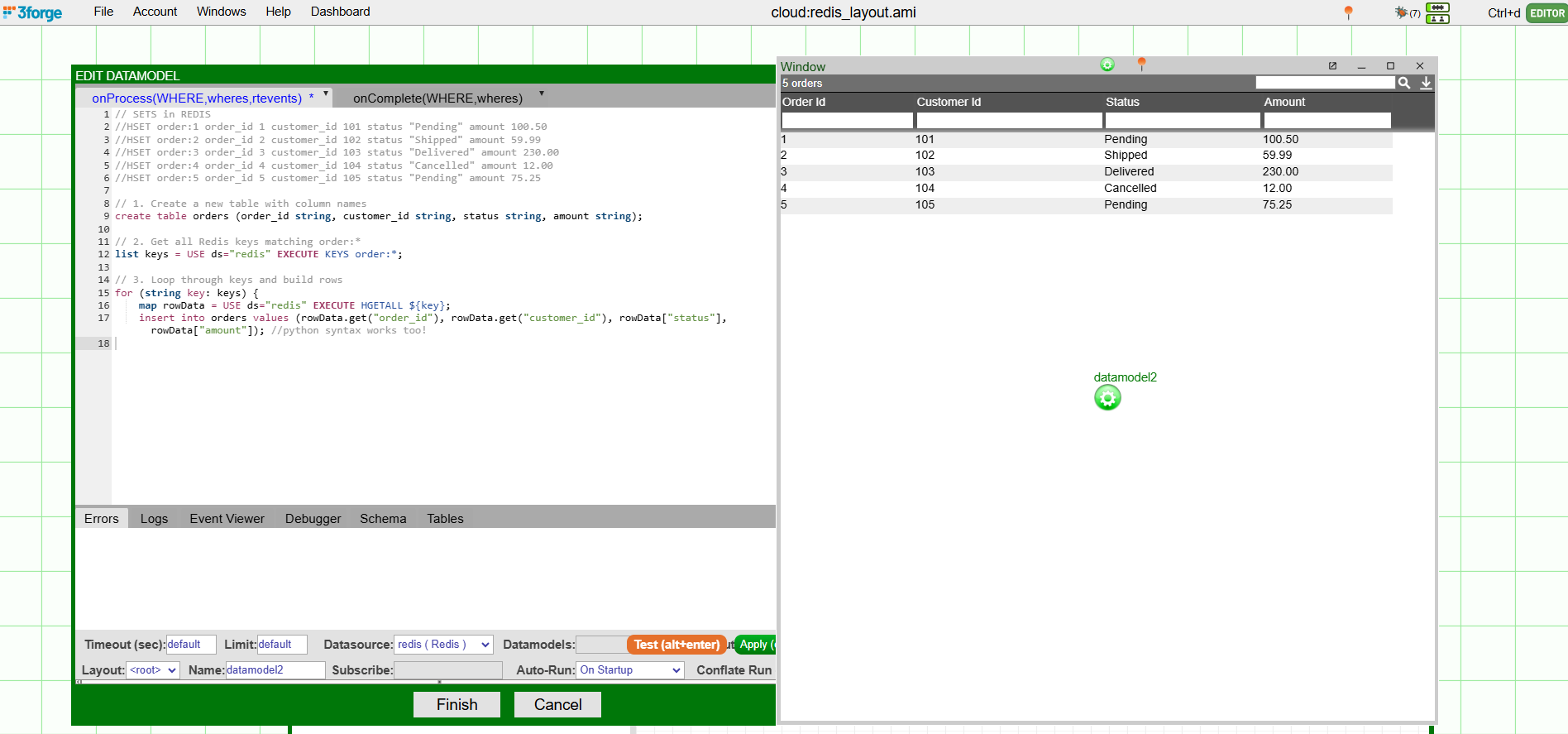
Example: Building a Table in AMI from Redis Data
Ensure that you have a Redis adapter configured as shown in the setup steps above.
In this example, a Redis database is configured in AMI with the following hashed data:
To create a table with this data, navigate to the Data Modeler to create a new datamodel. In the onProcess() tab of the datamodel creation wizard:
This does three things:
- creates an empty table with the correct headings corresponding to the Redis data:
order_id,customer_id,status, andamount. - retrieves the keys from the Redis database using a supported Redis command and stores it in an AMI-compatible data structure.
- populates the table with the Redis data based on the key.