Realtime Messages
This page provides an overview of realtime messages used for communication with the 3forge AMI platform. It introduces message types, format, common use cases, and examples for quick integration.
Overview
The AMI Relay is responsible for sending and receiving messages to and from the AMI Center to either AMI Web or other external applications. For messages to reach the Center, they must be formatted correctly, with the Relay acting as an intermediary. Multiple Relays can connect to multiple Centers and applications; for more information on configuring multiple Relays see here.
To communicate with either a Center or a Web interface, messages must pass to the Relay via a specifed port corresponding to the AMI property ami.port. By default this is 3289, but can be configured to any port of your choosing assuming there are no conflicts.
There are a number of ways to send messages, and 3forge provides several clients for direct interfacing. The types of messages that the Relay can receive and send are "instructions:" well-defined, atomic, sequential and transactional messages.
Conventions
For the purposes of better understanding this guide, please take note of the following conventions being used: - This document is written from the perspective of the application. "Outbound" is the application sending data, and "inbound" is the Application receiving data - Trailing text is indicated with an ellipses or "..." - Special ASCII chars are qualified inside parenthesis - Brackets [] indicate optionally supplied data
Instruction Format
Instructions are the message format that the AMI Relay sends and receives. This protocol is designed to be flexible, compact and human readable. Each instruction must have a type and may contain a sequence number and timestamp. The general format for each message is:
Fields:
| Field | Description |
|---|---|
TYPE |
A single character representing the message type (e.g., L, O, D) |
#SEQNUM |
Optional. Sequence number for tracking message acknowledgments |
@NOW |
Optional. Timestamp in milliseconds (epoch) |
key=value |
Key-value pairs separated by pipes (|) |
Valid Outbound Message Types
L - Login
L must be the first instruction sent from the application after connecting to the Relay. It is used to establish identity and confirm a proper login.
| Required Parameters | Optional Parameters |
|---|---|
I: A universally unique string identifying the process. Multiple runs of the same application should have the same ID (I). If an application were to be shut down and restarted, the ID (I) should not change. |
P: Used to supply a fully qualified Java class name to an AMI Relay plugin. The class must implement the com.f1.ami.relay.AmiRelayPlugin interface. O: Used to supply options about the current session. The following options are available and can be used in conjunction by comma delimiting:
|
O - Object Add/Update
O sends new data or modifies existing objects.
| Required Parameters | Optional Parameters |
|---|---|
T: Table name. |
I: A unique string ID for the object used for updating the object later. Subsequent messages with the same object ID (I) and same running process ID (I) provided in the login (L) will cause an update. E: Expires on; negative for how far into the future from the time of message receipt in AMI Center and positive numbers are exact dates in the future based on Epoch time. Units are milliseconds. |
C - Command Definition
C defines a user-interactive command.
| Required Parameters | Optional Parameters |
|---|---|
I: Command ID. N: Name that is displayed to user in the right-click context menu. Note: Use periods (.) to create submenus, e.g.: N="order.cancel" |
L: Permissions Level of 0 means remove command, and any other number is used for entitlements as part of the AMI entitlement engine. A: Configuration for input form described in JSON format. See appendix for JSON Form layout. W: An expression that will determine which rows the command will be available at a row/node level. You may also reference user-specific variables: __USERNAME: Login name of user that is executing the command user.xxxxx: A property, associated with the user's entitlements that are prefixed w/ amivar_. To use legacy variables names such as user.username, set the property 'ami.web.support.legacy.amiscript.varnames=true'. For example, if the user has an attribute in the entitlements server amivar_group=sales, then the variable user.group will have the value sales. T: An expression that will determine which rows the command will be available at a panel level. You may also reference user-specific variables and panel specific variables:
H: Help, gets displayed in the top of the display box. P: Priority for display in the menu. Commands with a higher priority are listed in the context menu above those with lower priority, 0 = highest priority, 1 = 2nd highest, etc.E: Enabled where (expression) e.g. the command with E value below will only be enabled where the Quantity = 300 |
R - Response
R indicates a response to a client or system action.
| Required Parameters | Optional Parameters |
|---|---|
I: An ID uniquely identifying the command as sent from the Relay's execute command (E). This ID is generated by AMI and the application must use this ID when sending a response. S: The status of the command. 0 = Okay, 1 = Close dialog box, 2 = Leave dialog box open, 3 = Close dialog box and modify data. |
M: A string message to send to source that requested command be run. X: Execute AmiScript on the user session that requested command be run. See the Reference section of the documentation for details. |
D - Object Delete
D deletes objects by ID.
| Required Parameters | Optional Parameters |
|---|---|
I: A unique string ID for the object. Each new object must have a unique object ID (I) for scope of the running process ID (I). To delete an object, the same object ID (I) must be supplied. T: To delete an object, the object type must be supplied. |
N/A |
X - Exit
X gracefully closes the session.
| Required Parameters | Optional Parameters |
|---|---|
| N/A | Optional parameters are used to provide metrics about the application at time of shutdown. |
H - Help
H prints out general help. This message type does not take parameters.
P - Pause
P creates a pause in the connection for a specified period of time.
| Required Parameters | Optional Parameters |
|---|---|
D: Delay. |
N/A |
Valid Inbound Message Types
M - Status Message
M authenticates the user to the AMI server.
| Parameters always supplied by Relay | Parameters optionally supplied by Relay |
|---|---|
S: The status of the received instruction. A value of 0 indicates it was successfully processed by the Relay; a value of 1 to 255 indicates an error. Q: The sequence number of the instruction sent from the Relay. M: A human-readable message for the status. |
N/A |
E - Execute Command
E sends or receives system or app status info.
| Parameters always supplied by Relay | Parameters optionally supplied by Relay |
|---|---|
I: Unique ID as a string. This ID is generated by AMI. C: The ID of the command. U: User name of the person doing the command. |
O: Associated object ID. This will be supplied if the command is executed on an object. |
Quick Start
Login
I: UsernameAPP: Optional application name
Add or Update Object
T: Type of object (e.g., Order, Execution)I: Unique ID for the object
Delete Object
- Deletes an object with the specified ID and type.
Logout (Safe Exit)
Cheat Sheet
The most common realtime operations are:
- L — Login: Authenticate and establish a session.
- O — Add / Update Object: Send or update data objects in AMI. Fields include object type, ID, and attributes.
- D — Delete Object: Remove an object from AMI by specifying its type and ID.
- X — Safely Close Connection: Logout and close the session cleanly.
Data Type Formatting
Values sent to AMI must be formatted correctly. Supported types include:
- int: 32-bit integer.
- long: 64-bit integer.
- double: 64-bit floating point.
- float: 32-bit floating point.
- string: UTF-8 encoded text.
- UTC: Standard ISO-8601 timestamp (e.g.,
2025-08-18T12:00:00Z). - JSON: Encoded JSON objects.
- Binary: Base64-encoded binary data.
- Boolean:
trueorfalse. - null: Explicit null value.
See below for example syntax:
| Type | Syntax | Example | Notes |
|---|---|---|---|
| Integer | nnn |
-234 |
Whole numbers default to integer |
| Long | nnnL |
234L |
|
| Double | nnn.nnnD |
123.123D |
Decimal if optional |
| Float | nnnF |
123F |
Decimals in a number default to float |
nnn.nnn |
123.123 |
Decimals default to float | |
| String | "sss" |
"what" |
Quotes must be escaped with a backslash \ |
| Enum | 'sss' |
'this' |
Quotes must be escaped with a backslash \ |
| UTC | nnnT |
1422059533454T |
Unix epoch |
"sss"T(*fff*) |
"20140503"T(yyyyMMdd) |
Uses date format (fff) to parse string (sss) to a utc | |
| JSON | "sss"J |
"{this:\\that\\}J |
Base 64 UU Encoded |
| Binary | "ssss"U |
"12fs1323"U |
Base UUEncoded |
| Boolean | true false |
true |
Case sensitive |
| Null | null | Null |
nnnrepresents 0-9. Numbers must be base 10 and can be signedsssrepresents alpha numericfffrepresents java syntax SimpleDateFormat
Advanced Usage
- C — Command Definition: Define custom commands your client can respond to. This lets AMI invoke actions in your application.
- R / E — Response & Error: Used to return results or errors for a given request (e.g., from a command or API call).
Data Storage (Advanced)
Data sizes Overview: Each parameter added to an object and application status message has a 3 byte overhead, plus additional bytes, depending on the data type. Please see the table below:

Keys: The length of a key has virtually no impact on memory. This is because all key names are indexed. AMI Supports up to 65,536 unique key names plus data types (T=). This is a hard limit per AMI Center and going beyond that will result in data loss. For example, the following 2 messages would result in 5 unique keys. Note that when key names and types (T=) are repeated then they do not count as a new unique key.
Enums (Advanced)
Clarification on Denoting Enums vs. Strings: Enums are surrounded using single quotes (') while strings are denoted using double quotes ("). For example (note the quote types):
Enum Storage Methodology: Using enums will dramatically reduce the cost of storing text that is often repeated. Instead of storing the actual value, just an index (binary number) is stored and regardless of how many times it is referenced only a single instance of the string is kept in a lookup table. The first 255 unique enum values received by the AMI central server will be indexed using a single byte index. The following 65,281 unique enum values received will be indexed using 2 bytes and the last 16,711,935 unique entries will use a 3 byte index. Be aware that the order in which unique enum values are introduced also determines the storage requirements for repeat entries.
Enum Scope: The scope of a particular enum is for an Ami Center. This means that the same index will be used regardless of application sending the enum, type of message it is in or parameter it is associated with. For example, the following will result in 3 enums (presuming these are the first 3 messages then all 3 of these would be indexed using a single byte):
Note: Exceeding 16,777,216 unique enums will cause the Center to treat remaining Enums as Strings.
Understanding Cost:
The first instance of an enum has significant overhead verses a String, but following instances will usually have a highly reduced overhead.
Description |
Enum Cost (Best case) |
String Cost (Best Case) |
Enum Cost (Worst case) |
String Cost (Worst Case) |
First entry for a string |
19 + (length x 2) |
4 + length |
21 + (length x 2) |
7 + length * 2 |
repeat entries for string |
4 |
4 + length |
6 |
7 + length * 2 |
Notes: (1) The length variable is the number of characters in the string. (2) Costs are in bytes.
The table above demonstrates the large cost for the first entry for an enum, but additional entries have a highly reduced cost which is regardless of string size.
JSON AMI Command Invocation User Form Definition
Structure
The below structure demonstrates how to construct a well-formed input user form. Forms have support for input fields which can contain any number of input arguments. Note that a form definition with neither a form stanza nor a timeout stanza will result in no dialog and immediate execution of the command when the user selects the command.
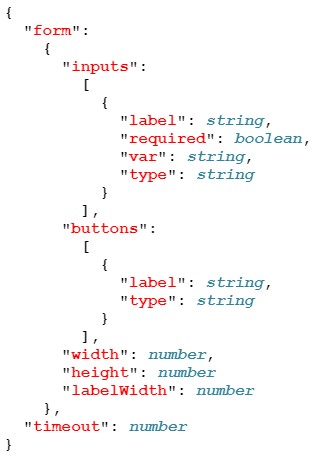
Example

Description of AMI JSON Form Definition Fields
| Name | Type | Description | Req. |
|---|---|---|---|
form |
object | Object which identifies the form presented to the user | |
form.inputs |
array | Array which lists the input widgets inside the form | |
form.inputs.label |
string | Label displayed next to the input | X |
form.inputs.var |
string | key associate with the value that is sent to the back end | X |
form.inputs.required |
boolean | If true, user must supply a non-blank value, default is false | |
form.inputs.pattern |
string | The pattern that the user-supplied value must match to | |
form.inputs.type |
String (enum) | The type of user input, default is text. Permissible values:text - regular, single line text inputtextarea - multi-line text inputselect - multi option select fieldhidden - field is hidden from userpassword - hides letters |
|
form.inputs.value |
string | Reference a variable on selected record | |
form.inputs.options |
array | List of options, required & only applicable if type=select | |
form.inputs.options.value |
string | Value sent to backend if option is elected. | X |
form.inputs.options.text |
string | Text displayed to user, if not supplied value is used | |
form.buttons |
Array | Array which lists the buttons at the bottom of the form | |
form.buttons.type |
string | The type of button. Permissible values: submit - submit the form to backend cancel - cancel and close the form | X |
form.buttons.label |
string | The text displayed on the button | |
form.width |
number | Width of form in pixels | |
form.height |
number | Height of form in pixels | |
form.labelWidth |
number | Width of the labels column in pixels | |
Timeout |
number | Max time the user will wait for a response from the backend after submitting form, in milliseconds |