Scaling
3forge systems can be scaled up by running individual components independently and/or alongside each other for improved performance and abstraction.
Overview
3forge's architecture allows for easy scaling depending on your business needs. At a simplified level, 3forge's components can be thought of as the following:
- The graphical user interface (Web)
- The processing and storage unit (Center)
- The data transfer and communication component (Relay)
The AMI One application contains and runs all three components by default. The user can configure their 3forge instance(s) such that one or a combination of each components is running.
Examples of this could be:
- A single Web dashboard connected to multiple Centers
- Multiple Relays connected to different data streams routed into a single Center
- Multiple Centers communicating with other Centers locally or externally via multiple Relays
Set Up Multiple AMI One Applications
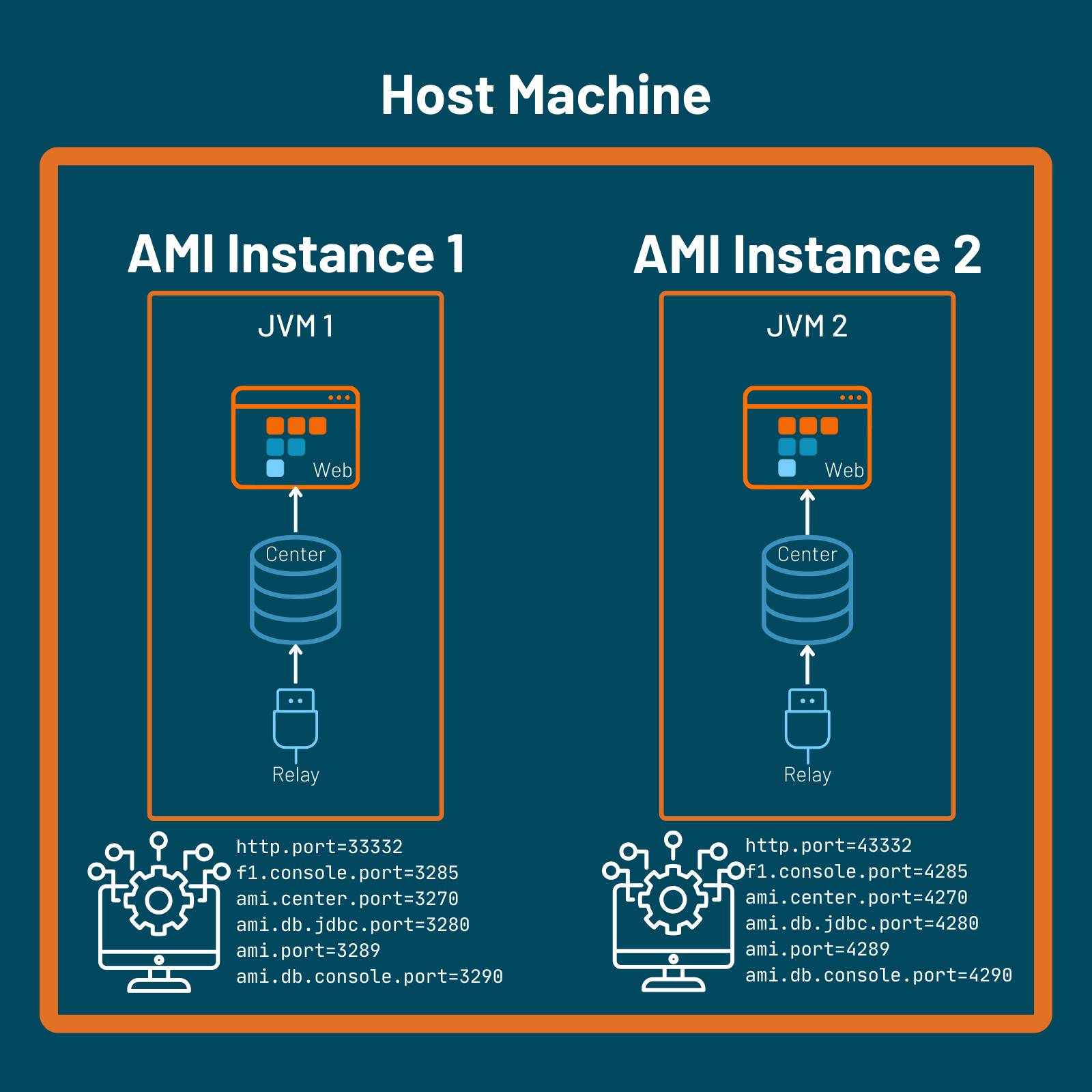
Multiple AMI One instances can be run on the same host machine. Refer to this section for configuration details.
Warning
Each 3forge instance must have unique ports with no port conflicts. When configuring new instances of 3forge, you will need to manually assign new port values.
3forge Default Ports:
We would suggest changing the prefix for consistency and ease of port management. For example:
Running Individual AMI Components
To run each component individually, you will need to configure multiple instances of AMI such that only the intended component is included.
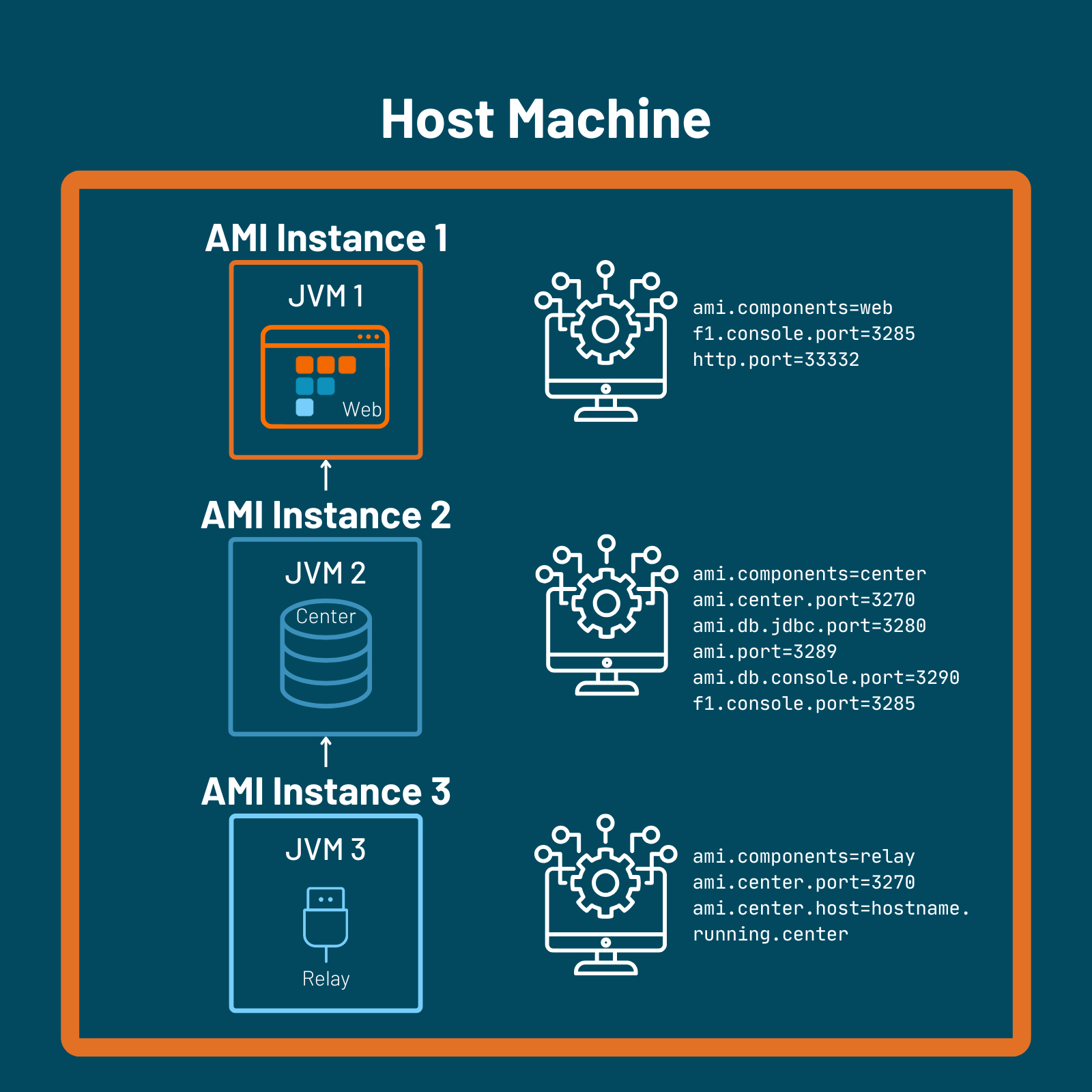
You will need to alter the local.properties file of each installation by changing the property ami.components. This file will be located in the amione/config folder of each AMI instance's directory.
A full guide on the list of properties to configure for each component can be found here.
The examples below utilize the same configuration guide.
Connecting Relay and Web to Multiple Centers
Centers can be horizontally scaled to distribute computational load or build in redundancy. Ensure that each Center is configured with its own unique respective ports.
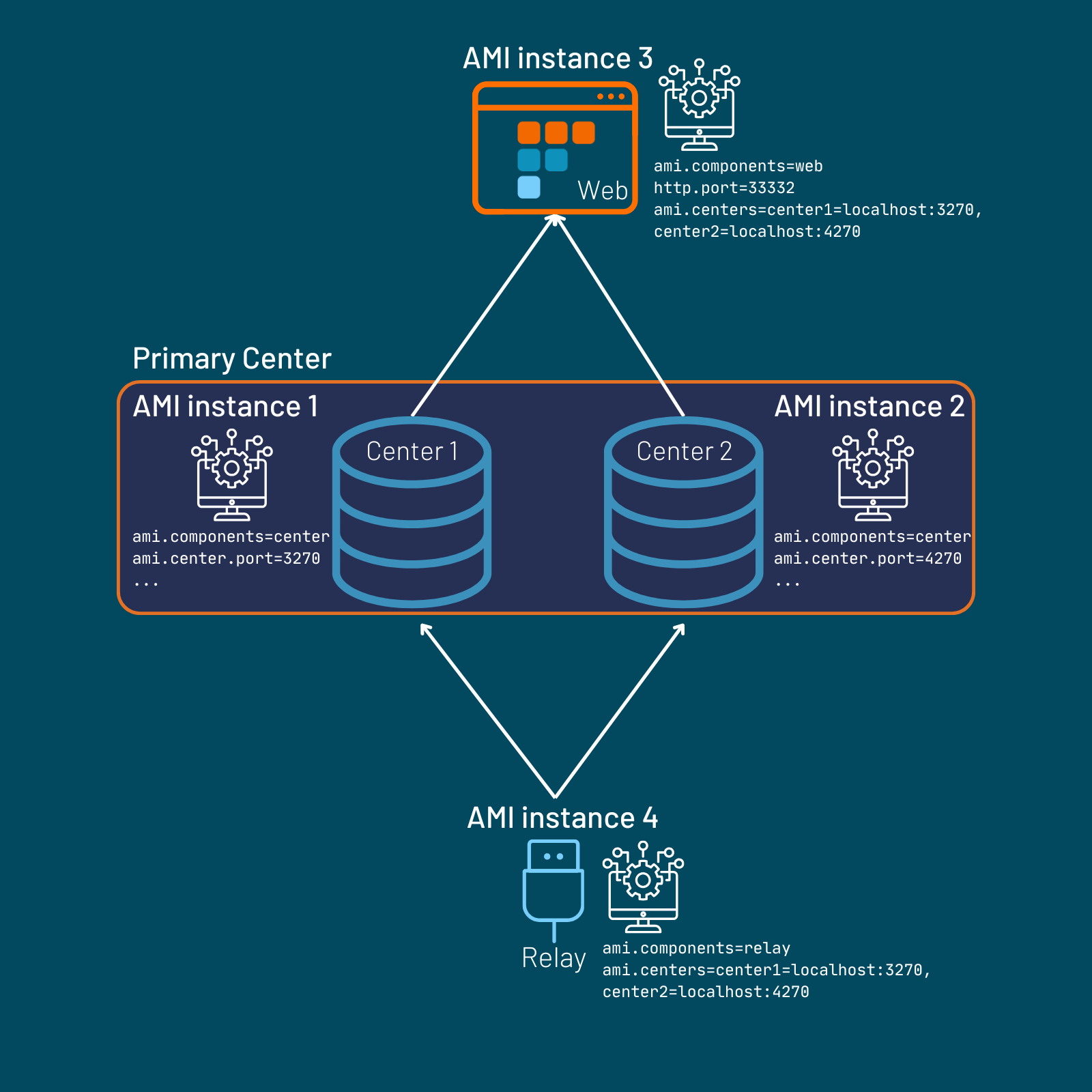
In this structure, the Web can access tables from both Centers. Tables with the same schemas across Centers are unioned in the Web as one table.
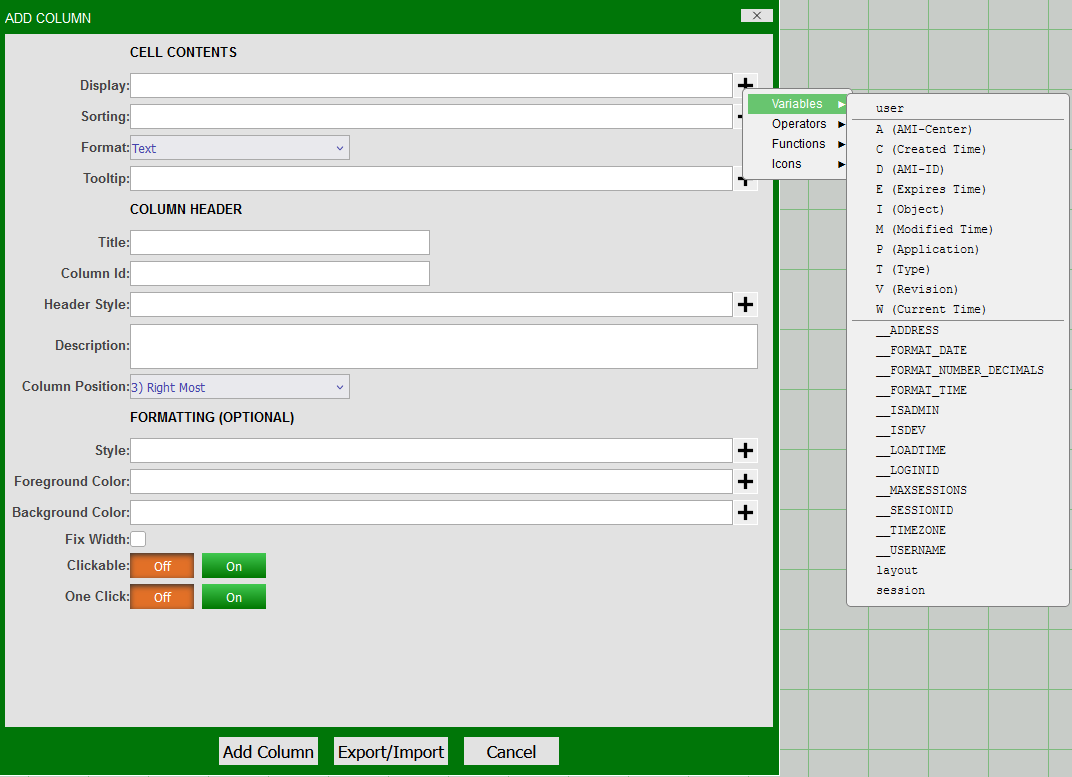
To determine which Center an individual row of data has originated from, you will need the reserved column "A."
This can be easily added from the realtime table panel settings by going to the settings cog and selecting "A" from Add Column->Variables.
Note
Not all reserved columns are populated by default. Please check the list of reserved columns and alter the schemas of your Center tables accordingly if they are required.
By default, a Relay will send the same data to all connected Centers. To implement conditional routing logic, see the guide for configuring the relay.routes file.
Connecting Multiple Webs to a Center
Systems with resource-heavy datamodels can rapidly become memory-intensive as multiple users interact with them. 3forge supports using multiple Web instances that connect to the same Center to reduce overhead. Each Web session will have access to the same Center schemas without compromising memory usage across multiple users.
In this case, each Web instance's local.properties must be configured to have the shared Center:
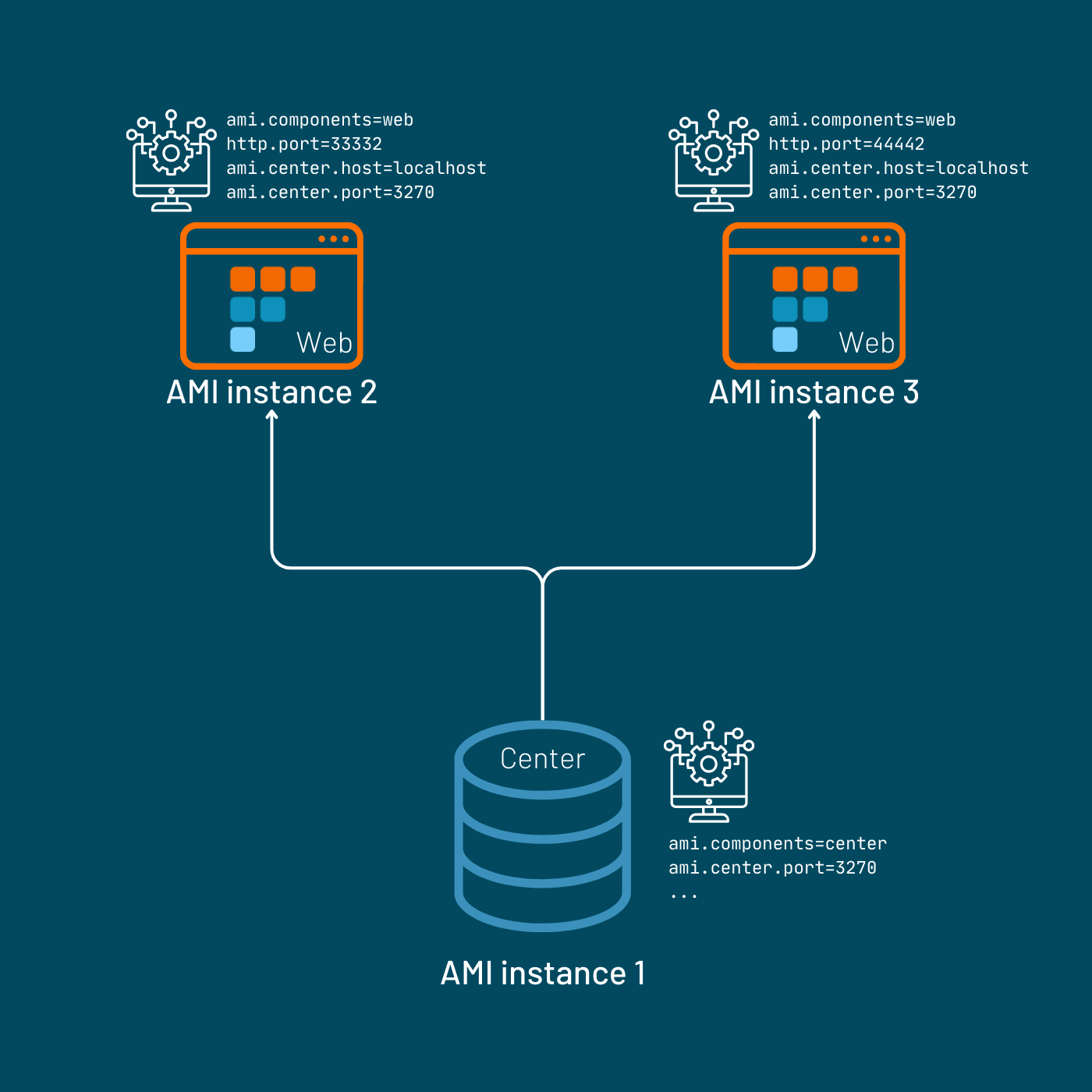
Use in conjunction with the WebBalancer (see below) for streamlined user traffic management.
Vertical & Horizontal Scaling
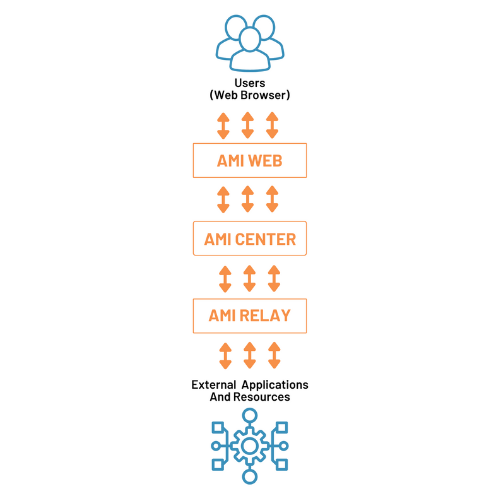
3forge can be vertically scaled across 3 processes:
For additional capacity or global usage, 3forge also supports horizontal scaling:
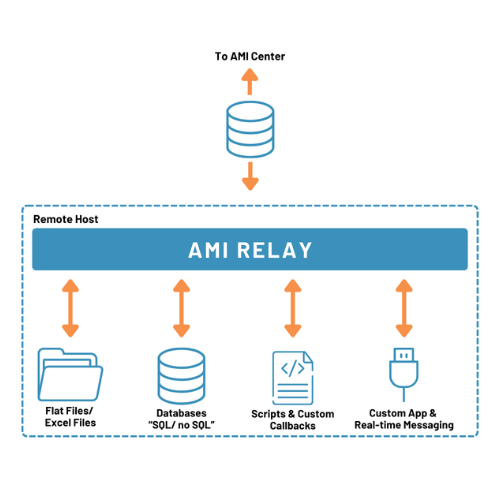
- Any number of Relays can be connected to any Center, allowing for increased connectivity to outside applications and resources.
- Any number of Web servers can be connected to a Center, allowing for an increased number of users and regions.
Use Cases
Listed below are a sample of use cases implementing scaling with 3forge.
For support and guidance on scaling up 3forge for your enterprise purposes, please contact us at support@3forge.com.
Load Balancing with WebBalancer
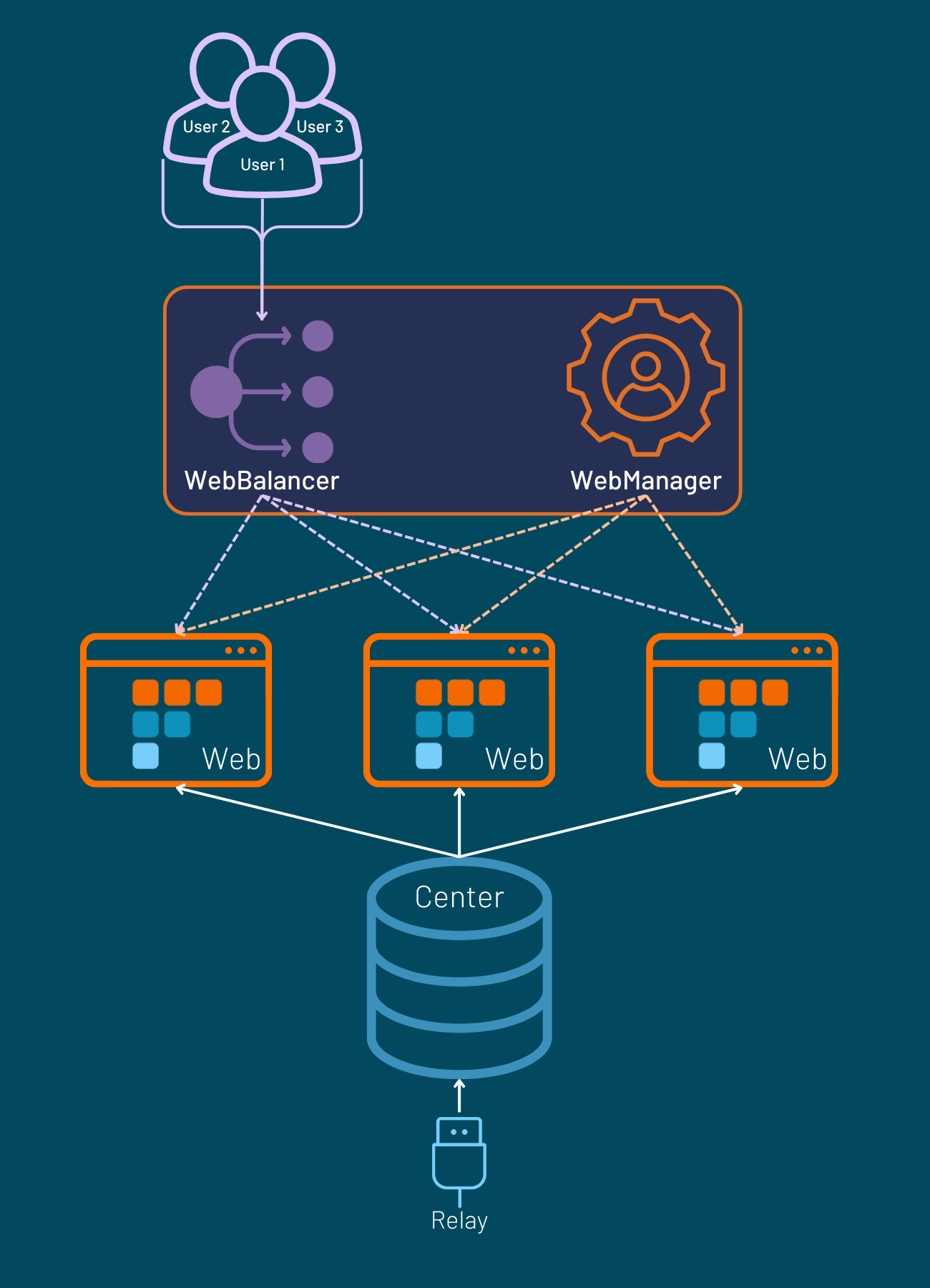
For systems with multiple Web instances, use the WebBalancer to automatically distribute user traffic across multiple Web instances. This ensures resiliency by routing users to a different Web instance in case one goes down.
Setup
The WebBalancer is an optional component of 3forge. In order to use the WebBalancer, you will need to do the following:
- Set up a
webbalancer.routesfile with the necessary routing logic. - Set up a 3forge instance and add the following components property to the
local.propertiesfile:
To see a full guide on configuring WebBalancer, please refer to this page.
Serving Layouts/Preferences From WebManager
Each Web instance stores its own dashboards and other user-related settings such as preferences by default. This information is not typically shared among other different Web instances/sessions.
The WebManager acts as a centralized server or hub, storing information on different users' settings. They can then be used, even if the user's Web session is rerouted.
Use WebBalancer and WebManager together to allow users to access their settings and files across your system's different Web instances.
Setup
Like WebBalancer, WebManager is an optional 3forge component and is set up similarly:
-
Set up a 3forge instance and set the components property in the
local.propertiesfile to the following: -
In each Web instance, include the WebManager host and port in their respective
local.propertiesfiles:
Refer to the WebBalancer/WebManager page for more information on setup.
WebBalancer and WebManager Setup
Parent-Child Setup with Replication for Faster Reads
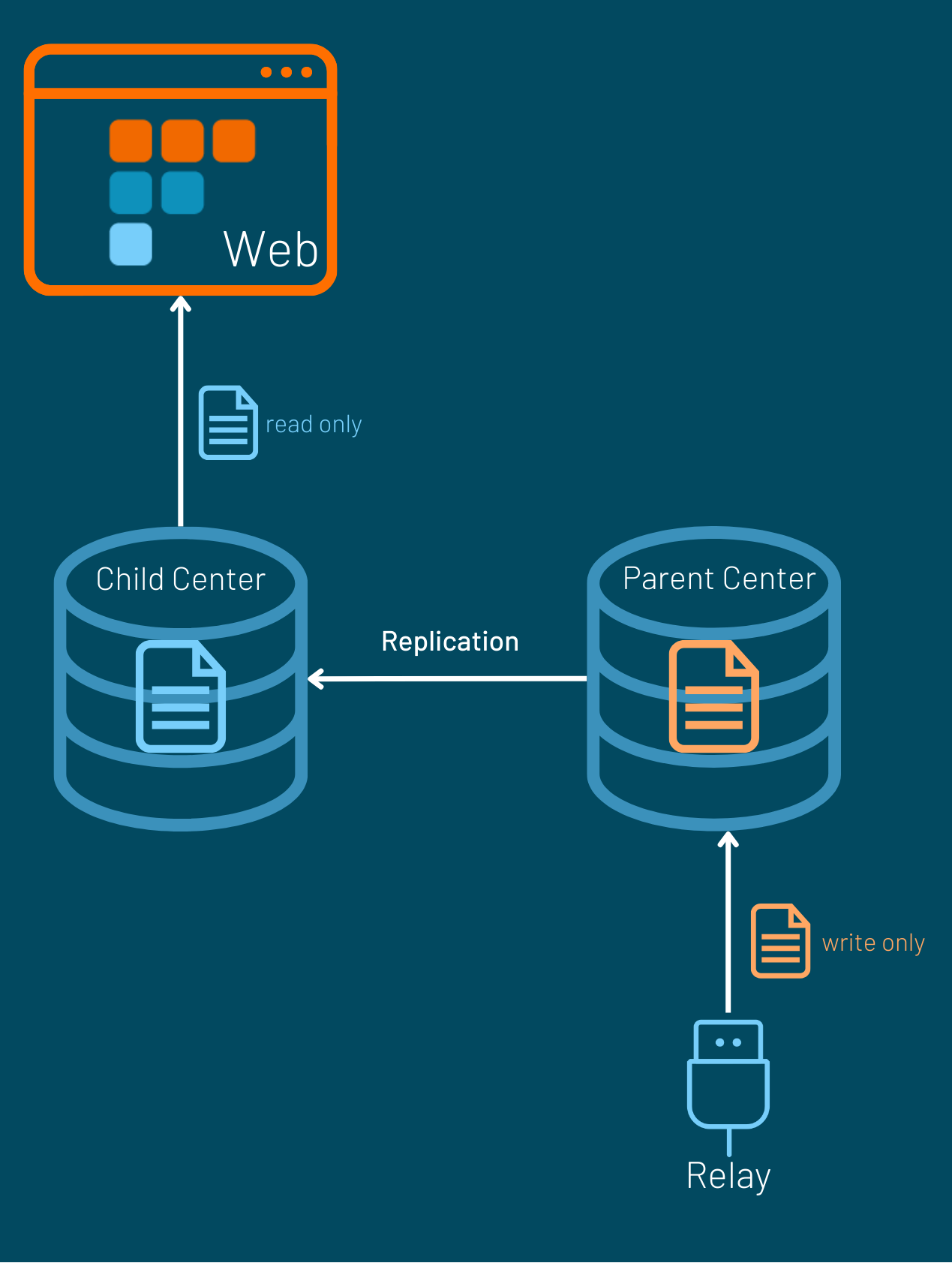
3forge applies a database-level lock for realtime tables and a table-level lock for HDB tables during write operations. Writing to tables is done in batches allowing for uninterrupted reads for most cases. However, generally the HDB is faster to read from in high-volume and low-latency use cases.
Using Center replication, users can set up a parent-child architecture with 3forge Centers with a source Center that processes only writes, and a replicated Center that serves only reads. This type of access enables extremely efficient read speeds and be scaled across multiple Centers.
Manage Throttling with Replication
Replication is also used to control throttling.
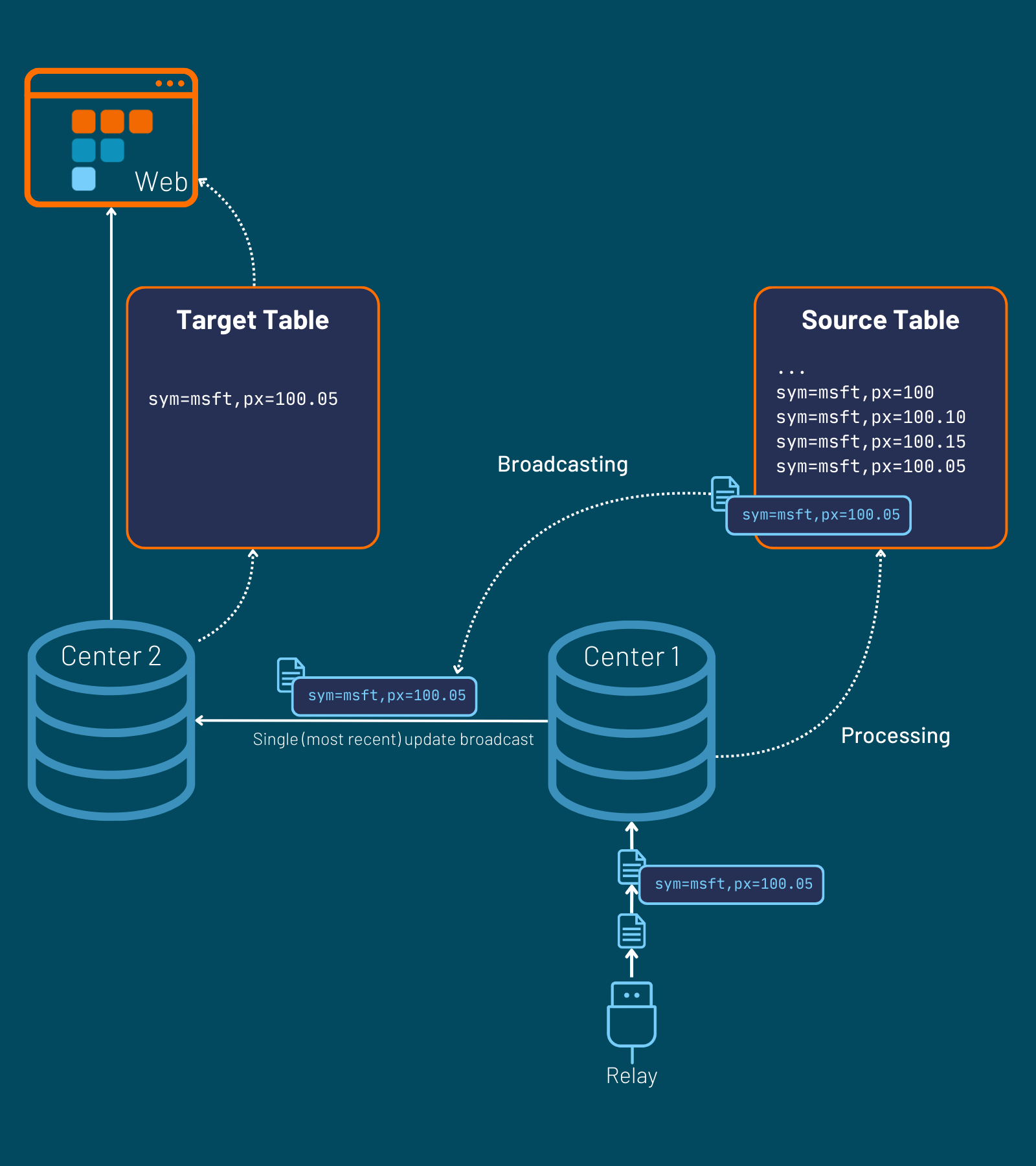
A typical 3forge setup often includes a high-volume Relay connected to a Center; the Center then uses this data to populate a realtime table. Each time the Center receives new data, it undergoes some computational processing.
The Center's table can be configured to broadcast data at a slower rate to some target table on another Center. This can reduce computational overhead by allowing users to reduce the frequency of data retrieval as necessary. This table can then be used for visualizations and other intensive calculations.
Broadcast rate in a realtime table can be configured with the RefreshPeriodMs option. In this setup, only the most recent update retrieved in the refresh period is broadcast to the target Center.
Sharding and MapReduce
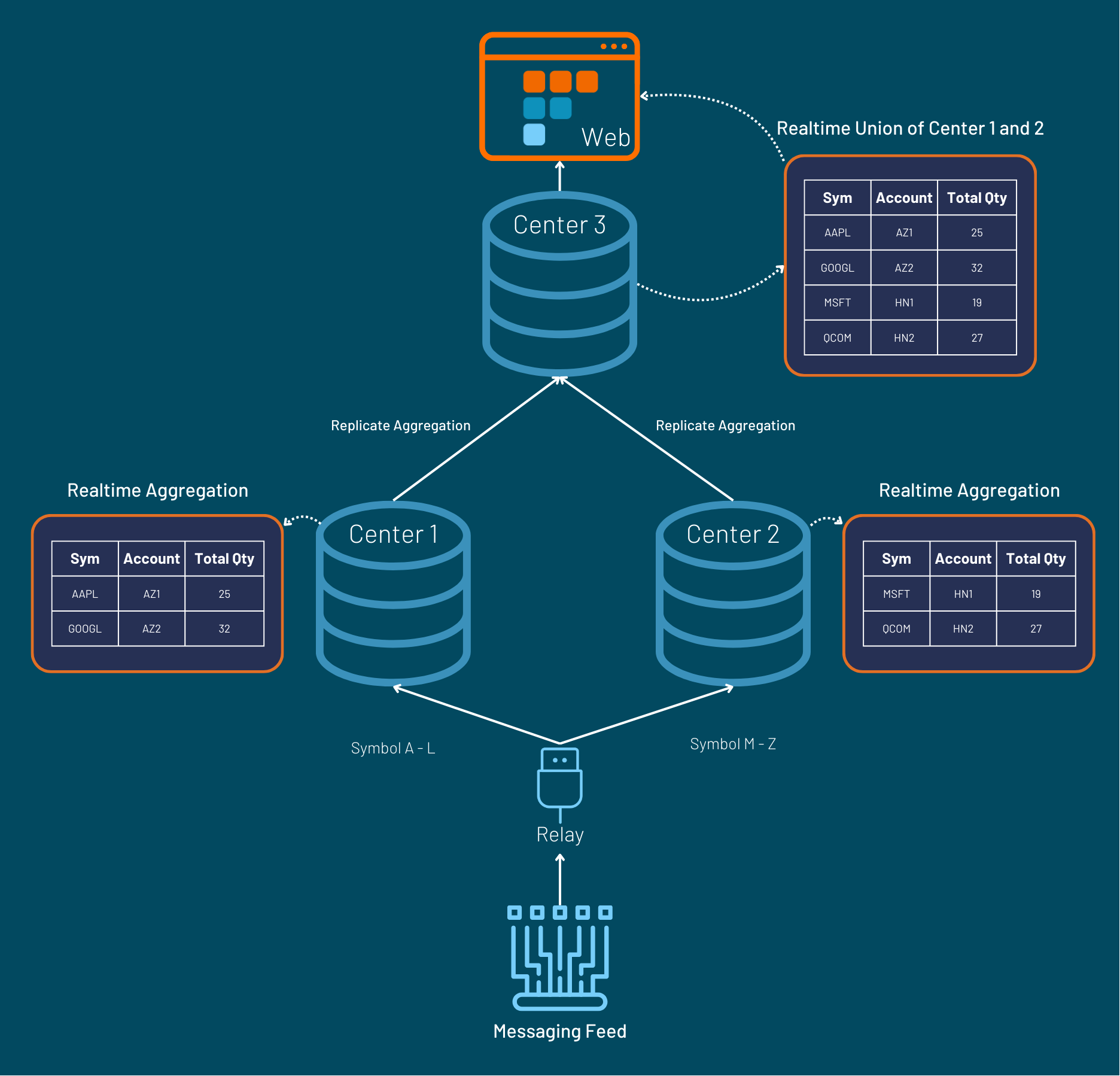
Sharding and MapReduce can be achieved in 3forge with just a few steps.
The Relay should be configured to send messages to multiple Centers based on the sharding key defined in relay.routes file.
Each Center can then perform their aggregations locally and replicates the results to a downstream Center, reflecting a global aggregated view.
Archiving directly to HDB
Data can streamed directly into HDB as opposed to archiving from realtime to hdb. The Relay needs to be configured to route messages both into realtime and hdb tables.