Advanced Configurations for 3forge
Overview
3forge is designed to be entirely modular. By default, running the AMI_One application will launch all 3 components: Center, Web, and Relay; however, 3forge supports advanced configurations to scale for your enterprise needs.
Note
For more information on scaling, including use cases, see our dedicated page here.
This page will provide a brief guide of the most common ways to configure 3forge beyond its default installation.
local.properties
Configuring 3forge is usually done via a local.properties file (recommended). This is a user-created file that can be easily customized with a large range of properties to configure a 3forge instance. Detailed information can be found on our configuration pages.
Note
It is possible to configure 3forge using Windows environment variables. Instructions for this are below.
Most advanced 3forge functionality will involve configurations in a local.properties file. This includes but is not limited to:
- Adding new datasource adapters and feed handlers
- Configuring multiple instances of 3forge on the same machine (see this section for more details)
- Running specific components of a 3forge instance (see this section for more details)
Configure Properties from Environment Variables (Windows)
Properties can also be configured using system variables if you do not wish to use the local.properties file.
Navigate to 'System Properties -> Environment Variables' and for each 3forge property you would normally configure in local.properties, create a new variable following this syntax: property_<AMI Property Name>=<value>.
Note
This is case sensitive, so please ensure that your environment variables match the same syntax of the properties specified in the configuration guide.
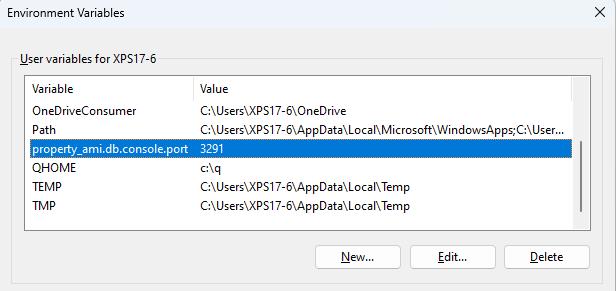
Warning
This will overwrite the existing property defined in local.properties and apply globally to all 3forge instances running on the current machine.
Configuring Multiple Instances on a Single Machine
Multiple instances of 3forge can be run on the same machine. Each instance should have its own directory separate to the others, e.g: an ami_project_1 and ami_project_2 directory with an installation in each.
Each additional instance must be configured to use different server ports - two processes cannot have conflicting server ports.
The default ports are listed below. For each instance of 3forge on the same machine, you will need to change these ports.
Console Port
-
Default value:
3285(listens)- The admin console port all components listen to
- Can be used to retrieve advanced technical information about your 3forge runtime and is necessary for each Center to run
- Please contact us at support@3forge.com if you need to use this port to debug your 3forge instances
- To disable, use
-1
The Center
-
Default value:
3270(listens)- Sets the port of the primary instance of the Center for more connections from other Web and Relay instances
- Also sets the connecting port of Relay & Web components to this Center if configured and launched together
-
Default Value:
3280(listens)- Sets the port for connecting to 3forge via the JDBC driver
-
Default Value:
3290(listens)- Sets the port for connecting via telnet command line interface
The Relay
-
Default Value:
3289(listens)- Sets the port that applications connect to on the Relay's host machine. See AMI Realtime Messages for the messages format 3forge expects
The Web
-
Default Value:
33332(listens)- Sets the port that web browsers use to connect to the Web
-
Default Value:
33333(disabled, listens)- Sets the port that web browsers use to connect securely to the Web
Session
-
Default Value:
F1SESSION- Unique cookie identifier for each session hosted on the machine
Running Components Independently
By default, 3forge launches the Center, Relay, and Web, but can be configured in local.properties so that only one or a combination of components is run.
A list of accepted configurations and their properties are listed below.
Note
We use the default ports in the examples, but you are welcome to assign your own. Just ensure there are no port conflicts.
Default
Run the center, relay, and web:
Center
Run only the center:
Relay
Run only the relay:
Note
The Relay can connect to multiple Centers, with a comma-delimited list entry e.g.: ami.centers=center1=host.running.center1:3270,center2=host.running.center2:3270,center3=host.running.center3:3270.
Web
Run only the web:
Center and Web
Run the center and web:
Center and Relay
Run the center and relay:
Web and Relay
Run the web and relay:
Relay and Multiple Centers
Run the relay connected to multiple Centers:
Web and Multiple Centers
Run the web connected to multiple Centers:
Additional Notes
- Port 3270 is the default port that the Center listens on and that the Web/Relay connect to
- The Web server never connects to the Relay directly, both are connected via the Center
- The Center starts up the primary server port (listener) that multiple clients, either Relay or Web, can connect to
- The primary Center will be the first Center in the delimited list denoted by
ami.centers