Security Defaults
3forge Enterprise ships secure by default. TLS is enabled out of the box, components are sandboxed to their working directory, and every secure listener other than the Web and WebSocket listeners enforces mutual TLS.
Default Login
Windows ships no default login.
On first start, you are prompted to create the initial admin username and password. That account becomes the root of your user store.
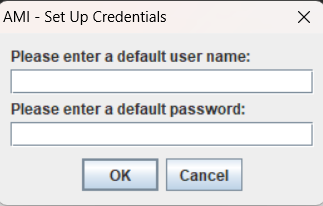
This can be changed at any time in access.txt.
Linux ships no default login either. AmiCore refuses to start until you create data/access.txt, and the credentials it holds are the only ones that work.
Known issue: The banner's Default Username and Default Password lines are wrong
On a successful start the banner prints Default Username: demo and Default Password: demo123. Those credentials do not work. The pair is printed regardless of what data/access.txt contains. Log in with the username and password you put in data/access.txt.
This can be changed at any time in access.txt.
TLS On by Default
Enterprise ships active keystores in the installation's keys/ directory, and HTTPS is enabled on port 33333. The directory holds:
3forge.jks: keystore for the native listeners, the Center, JDBC, Relay, and Gateway3forge.pub: public key for3forge.jks, inssh-rsaform3forge.pem: keystore for the Web HTTPS listener3forge.pem.pub: public key for3forge.pem, inssh-rsaform3forge.auth: authorized-clients allowlist, onessh-rsakey per line
Apart from the browser-facing Web and WebSocket listeners, every secure listener enforces mandatory mutual TLS: client authentication is enforced and cannot be turned off. Each external client must present a certificate whose public key is listed in the server's authorized-clients file, keys/3forge.auth, or the connection is rejected at the TLS handshake. The Web listener on 33333 serves TLS but does not request a client certificate. Mutual TLS is a first-class part of connecting any client, and is documented in full on its own page:
The shipped certificate is self-signed
The default keystore contains a self-signed certificate. A validating client (e.g: an MCP client over HTTPS) needs the certificate exported and trusted and a Subject Alternative Name matching the URL host, or it refuses to connect even after trust is set up.
Contact 3forge support for the specifics of the certificate shipped with your build. See Server Certificates for replacing it, and AI Agent Access (MCP Server) → transport security for trusting it in an MCP client.
File-System Sandbox
A component may only read and write inside its working directory unless additional paths are listed in ami.component.allowed.dirs (comma-delimited). Set this only if a component needs to access files outside the launch folder, e.g: when your existing configuration references paths outside ami/amicore:
Authentication Surfaces
Credentials are verified against the same user store across surfaces:
- Web login (browser session cookie).
- REST / MCP via HTTP Basic against the Web REST authenticator: see AI Agent Access (MCP Server) → authentication.
- Admin console (
ssh -p 3285 user@<host>): see Admin Consoles.
Because the resolved user is the identity every call runs as, a caller only reaches operations their entitlements permit.
Checklist
Before going live:
- Create the initial admin on first start (no
demo|demo123). - Change
ami.keypassfrom its shipped default, or overrodehttps.keystore.password. - Decide on the certificate strategy: plain-HTTP REST port on a trusted network, a regenerated keystore with a matching SAN, or a CA-signed certificate (recommended for production).
- Provision client public keys into the authorized-clients file,
keys/3forge.auth, for every external client (see Mutual TLS). - Review
ami.rpc.ws.bindAddressand/lsp-openbefore exposing the developer-tools WebSocket off-host (see Language and Debug Servers).