Gateway
The Gateway is the 3forge Enterprise component that fronts one or more Centers and presents a single endpoint external clients connect to instead of connecting to each Center directly. It exposes 2 network listeners, routes queries and subscriptions to the Centers behind it, and applies mutual TLS, authentication, and entitlement filtering at that one interface.
Overview
A client connected to the Gateway sees the Centers behind it as one system, over data that may be sharded across several Centers. A subscription entering the Gateway is fanned out to every route, and a query to every route whose Center holds all the tables it names; the results are merged: multi-route results are combined, and aggregate queries are re-aggregated across routes. That merge is a union across Centers, not a single merged database, so a query cannot join rows in one Center against rows in another. This gives one place to apply authentication and entitlements, one place to define which targets are reachable, and one address to publish to client teams, while the Centers behind it can be added, removed, or reorganized.
Read access is federated across Centers, with 2 limits worth knowing before pointing a BI tool at the Gateway:
- Query predicates use AMI-expression syntax rather than ANSI SQL
- The JDBC path is read-only. See JDBC Access.
The Gateway presents 2 listeners:
- Native listener (default port
3406): serves client libraries, for queries, subscriptions, and procedure calls. - JDBC listener (default port
3407): serves SQL and business intelligence tools through the JDBC driver.
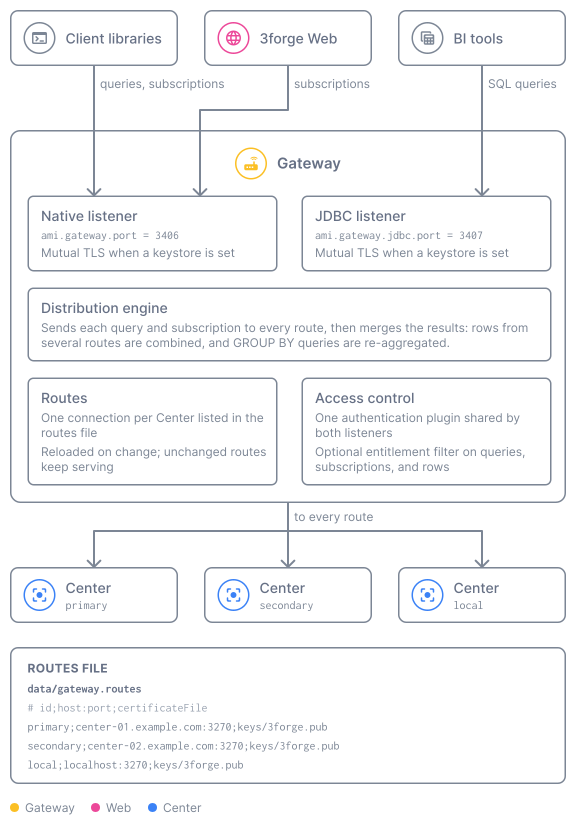
Features
- One endpoint for many Centers: clients connect to a single address and reach every Center the Gateway routes to, without knowing the physical topology.
- SQL and BI access over JDBC: connect Tableau, Power BI, and other JDBC tools through the JDBC driver. Read-only, and predicates use AMI-expression syntax rather than ANSI SQL, which a BI tool's generated
WHEREclauses will hit, see JDBC Access on a dedicated listener. - Mandatory mutual TLS: whenever a listener has a keystore configured, clients are admitted only if their certificate is on that listener's authorized-clients list.
- Hot-reloadable routing: edit the routes file and the Gateway applies the change without a restart, restarting only the routes that changed.
- Server-filtered streaming: subscribe to specific columns of a table with a
WHEREclause applied at the Center, rather than streaming a whole table to the client. - Per-user entitlement filtering: an optional filter plugin can reject, narrow, or rewrite each query and subscription, down to individual rows.
Distribution model
A query is sent to every route whose Center holds all the tables in its FROM clause, and the
responses are merged into one result; a route without one of the tables is skipped. For a plain
query, same-shaped results from each route are combined into a single result set: a union, row
for row. For an aggregate (GROUP BY) query, the per-route results are re-aggregated so the
totals are correct across those Centers. If no route holds all the tables, the query fails with
GATEWAY: Table not found. See Routing.
A query cannot join across routes. Each route answers the query independently against its own Center, and the Gateway combines the answers; it does not match rows from one Center against rows from another. A join inside a single route's Center works as that Center supports it. If you need data from two Centers related to each other, do it in the client or replicate the smaller table.
Deployment
A Gateway is deployed to front several Centers, not one. Its purpose is to give client teams a single place to reach an estate of Centers, so the usual shape is one Gateway with a route to each Center it serves. Running a Gateway in front of a single Center gains the governed endpoint and the entitlement filter, but none of the federation the component exists for.
Where to go next
| Page | What it covers |
|---|---|
| Quickstart | Add the Gateway component, confirm its routes file, and connect once over each listener |
| Configuration | Every ami.gateway.* property, grouped by listener and function |
| Security | Mandatory mutual TLS, the authorized-clients file, authentication, and entitlement filtering |
| JDBC Access | Connecting SQL and BI tools through the JDBC driver |
| Routing | The routes file, selective hot-reload, and the route management commands |
| Streaming | Server-filtered live subscriptions and using them from the Web |