JDBC Access
The Gateway JDBC listener accepts connections from SQL clients and business intelligence tools through the JDBC driver. This page covers the driver, the connection URL and its options, protocol version negotiation, the supported SQL, and querying from the Web.
Overview
The listener implements a JDBC driver rather than a database wire protocol. Clients load
com.f1.ami.amidb.jdbc.AmiDbJdbcDriver and connect with a jdbc:amisql: URL, as they would for any
other JDBC data source. The driver self-registers with the JDBC DriverManager when its class is
loaded.
Because the listener is a JDBC driver and not a PostgreSQL or MySQL wire protocol, a tool cannot connect using a driver it already ships. The tool must allow registering an arbitrary JDBC driver and supplying a custom connection URL. Most SQL and BI tools support this; those that only offer a fixed list of database types do not.
Prerequisites
- A running Gateway with the JDBC listener reachable. See Gateway Configuration.
- The JDBC driver available to the client, providing the class
com.f1.ami.amidb.jdbc.AmiDbJdbcDriver. See Obtaining the driver. - Credentials valid for the authentication plugin configured on the Gateway, and, when the listener has a keystore, a client certificate authorized for it. See Security.
Obtaining the driver
How a client gets the driver depends on the language it is written in.
Python clients do not need the driver. The pyami-3forge distribution speaks to the listener
directly through its DB-API driver, pyami.db.ami_dbapi, with a SQLAlchemy dialect alongside it in
pyami.db.sqlalchemy_ami:
A Java client or a BI tool registers a jar. The driver class ships inside the server's own
lib/amicore.jar, which is the only jar in an installation. There is no smaller client-only jar to
distribute, so a tool that needs the driver is pointed at a copy of amicore.jar.
Registering the server jar in a BI tool
amicore.jar is the whole server distribution, around 21 MB, rather than a driver package.
It works because it contains the driver class and everything the driver needs, but it carries
far more than a client requires. Confirm with your 3forge contact how the driver should be
distributed to client machines in your deployment.
Connection URL
When the JDBC listener has a keystore configured (the shipped default), it enforces mutual TLS, so the
connection must supply isSecure=true and a client certificate:
Only a listener configured without a keystore accepts a plain connection:
The first connection needs TLS on a default Gateway
Because the shipped Gateway configures a keystore, a plain jdbc:amisql: URL without isSecure
is refused (Invalid protocol ... Perhaps server is configured for SSL). Supply the TLS options
above. Mutual TLS cannot be turned off while a keystore is set, see Security.
Connection options
Options are appended to the URL as query parameters, separated by &:
| Option | Purpose | Default |
|---|---|---|
username |
User to authenticate as | None (required) |
password |
Password for that user | None (required) |
timeout |
Query timeout, in milliseconds | 5000 |
isSecure |
Whether to connect over TLS | false |
sslPubFile |
Server public key file to pin | not set |
sslKeystoreFile |
Client keystore file for mutual TLS | not set |
sslKeystorePassword |
Password for that keystore | not set |
legacyVersion |
Force older protocol handling | newest |
ignoreRollback |
Whether to ignore rollback instructions | false |
Protocol version
2 protocol versions exist. When a connection is established, the client and server each report their version and the connection uses the lower of the two. A newer client connects to an older Gateway at the older version's capability. The server version is fixed by the build.
The ami.gateway.jdbc.protocol.version property does not set the negotiated version. It gates the
execution path: setting it to 0 forces the legacy query path. On the client, setting legacyVersion
on the URL forces older wire and serialization handling.
Supported SQL
The Gateway does not translate SQL dialects. A statement is passed through to the Center, which executes
it as AMI SQL. For aggregate (GROUP BY) queries, the Gateway re-aggregates results across routes so
the totals are correct across all Centers it fronts.
The JDBC path is read-only. SELECT statements pass through, but writes are rejected
(GATEWAY: Write operations are not supported: <statement>, for example ... not supported: INSERT). Send inserts, updates, and DDL to a Center directly.
WHERE clauses use AMI-expression syntax, not ANSI SQL: equality is == and string literals are
double-quoted, e.g: WHERE sym=="IBM". An ANSI predicate such as WHERE sym='IBM' is rejected
(WHERE clause must evaulate to boolean, not: String, reproduced with the product's own spelling),
so a BI tool that emits standard ANSI predicates fails outright on this listener rather than
returning unfiltered or wrongly filtered rows.
Steps
-
Make the JDBC driver available to the client. In a tool that manages drivers, register the driver jar and specify
com.f1.ami.amidb.jdbc.AmiDbJdbcDriveras the driver class. -
Create a connection using a
jdbc:amisql:URL, supplying the Gateway host and JDBC port, and the TLS options when the listener has a keystore. -
Supply credentials as URL parameters, or through the client's own credential fields if it constructs the URL.
-
Connect and run a
SELECT.
Result
The client connects through the JDBC driver and runs queries against the Centers the Gateway routes
to. If the connection is refused, confirm the JDBC listener is reachable, that the client address is
permitted by ami.gateway.jdbc.port.whitelist, and that the credentials are valid for the configured
authentication plugin.
Querying from the Web
The Web queries the Gateway through an AMIDB datasource, which gives one datasource over every Center the Gateway routes to. This walkthrough adds the datasource and a datamodel over one table.
Prerequisites for the Web
- The prerequisites above: a running Gateway, credentials valid for its authentication plugin, and a
client certificate for the JDBC listener. The shipped
keys/3forge.jksis admitted without an allowlist entry, see Security. - A table on a Center behind the Gateway. The
Executionstable from Gateway Streaming works.
Web steps
-
Open the Data Modeler with Dashboard -> Data Modeler, then click the "Attach Datasource" button.
-
Select "AMIDB" in the "Add Datasource" dialog. The "Configuration" tab opens.
-
Complete the "Configuration" tab with the values below. The form has no keystore fields, so the TLS options go in the "URL" field:
Field Value Name GatewayURL See below Username A user valid for the Gateway's authentication plugin. Password The password for that user. The URL field shows the keystore password
The "URL" field displays its text unmasked, including
sslKeystorePassword. Use a keystore whose password is safe to display on screen. -
Click the "Add Datasource" button. The Web tests the connection first and reports the number of tables it found through the Gateway, e.g: "Success: Added datasource. Found 20 tables."
-
Right-click the datasource in the object tree and select "Add Datamodel to Gateway". The "AMI Table Chooser" lists the tables from every route. Select
Executionsto preview its first 10 rows. -
Click the "Next" button, then the "Finish" button. The datamodel runs a query through the Gateway, e.g:
SELECT * FROM "Executions" WHERE ${WHERE}. Click the "Test" button before finishing to run it.
Web result
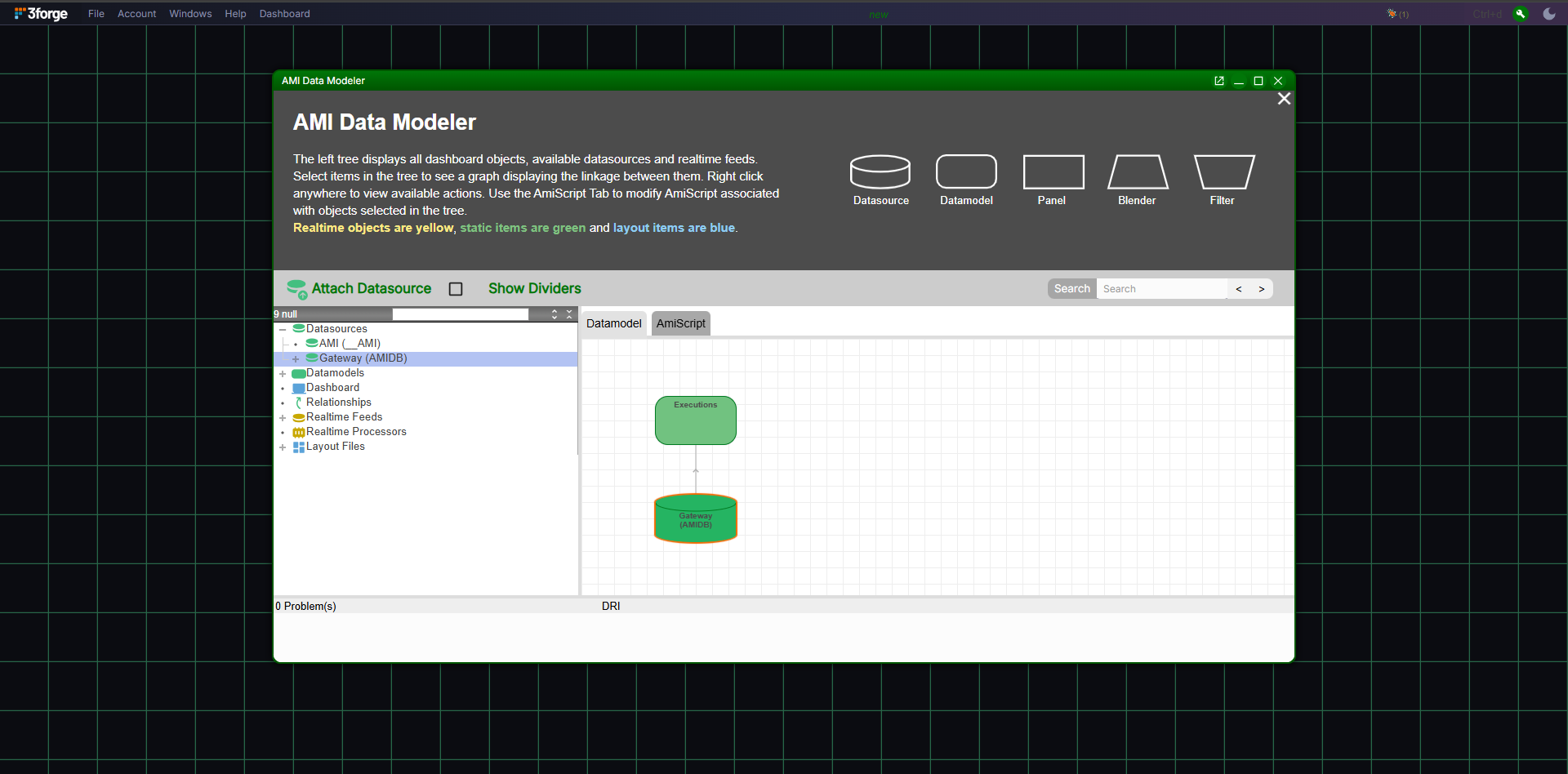
The Data Modeler shows the Executions datamodel linked to the Gateway datasource. The query goes to
every route whose Center holds Executions, and the results are merged, see the
Gateway overview. The JDBC path is
read-only, so the datamodel can query but not write.
Web troubleshooting
| Symptom | Cause |
|---|---|
| "Connection Failed: Could not connect ... Software caused connection abort" | Two causes produce this, and the client-side text does not distinguish them. No client keystore: the listener enforces mutual TLS, so add sslKeystoreFile, sslKeystorePassword and sslPubFile to the "URL" field. A keystore that is present but not authorized: the certificate's public key is not in the server's authorized-clients file. Only the server log distinguishes the two, so check it before assuming the first. |
What this does not support
- No PostgreSQL or MySQL wire protocol. The client must register the JDBC driver.
- No writes. The JDBC path is read-only; inserts, updates, and DDL go to a Center directly.
- No ANSI
WHEREsyntax. Predicates use AMI-expression syntax (==, double-quoted strings).