Gateway Streaming
The Gateway serves live subscriptions in which a client asks for specific columns of a table with a
WHERE clause, and the filter is applied at the Center rather than in the client. This page covers the
subscription shape, how the Gateway entitles subscriptions, a walkthrough for streaming a table into
the Web, and subscribing through a Gateway over WebSocket.
Overview
A subscription is expressed as a SELECT. The client names a table, the columns it wants, and an
optional WHERE clause; the Center evaluates the filter and streams matching rows. Because each
subscription carries its own columns and filter, a client receives a narrow stream rather than a whole
table. A Gateway fans a subscription out to the Centers it routes to and streams the merged result.
Subscription shape
A subscription is a single-table SELECT:
- Naming columns limits the stream to those columns.
*or omitting the column list streams all columns. - The
WHEREclause uses AMI-expression syntax, not ANSI SQL. Equality is==, and string literals are double-quoted, e.g:SYM == "IBM". - The
WHEREclause is evaluated at the Center. - A subscription is over a single table. Joins are not supported.
An out-of-focus flag controls whether the filter is re-evaluated as data changes. When it is on, the
Center re-evaluates the WHERE whenever an update changes a column it reads, and emits add and delete events as rows enter and leave
the filter. When it is off, the filter is applied only when a row is first added.
Entitlement
When an entitlement filter is configured (ami.gateway.filter.plugin.class), it is applied to every
subscription from a client that has logged in. The filter is attached when the client logs in, so a
client that has not logged in is not filtered; this is possible only when the Gateway's authentication
is DISABLED. The filter can reject a subscription, narrow its columns, tighten its WHERE clause, or
filter individual rows. It fails closed: if it errors while supplying its row filter, the whole snapshot
request is rejected, and if it errors on one subscription, that subscription is dropped. Unauthenticated clients are rejected when authentication is
required. See Security.
Using Gateway streaming from the Web
The Web reaches a Gateway through a named subscription endpoint, which the Data Modeler offers as a Live Query Subscription realtime processor. This walkthrough streams the ERIC and BABA rows of one Center table into the Web.
Prerequisites
- A Gateway running as a component of the instance, with a route to the Center that holds the table. See the Gateway Quickstart.
- A Web user that the Gateway's authentication plugin accepts. The Web logs in to the Gateway as the user signed in to the Web, so the same username and password must be valid for the Gateway. Add the user before the restart in step 2, because the Web does not retry a rejected login until it restarts. See Authentication.
-
A table on the Center. Run these statements on the Center, e.g: in the AMIDB Shell Tool (Dashboard -> AMIDB Shell Tool):
Steps
-
Name the Gateway endpoint. Add a line to
config/local.properties, in the formname=host:port[@pubfile]. Several endpoints are separated by commas. The name (lhbelow) is what the Data Modeler later offers as the subscription: -
Restart the Web, then sign in.
-
Open the Data Modeler with Dashboard -> Data Modeler.
-
Right-click "Realtime Processors" in the object tree and select Add Realtime Processor -> Live Query Subscription. The "Create Ami Center Subscription Processor" dialog opens.
-
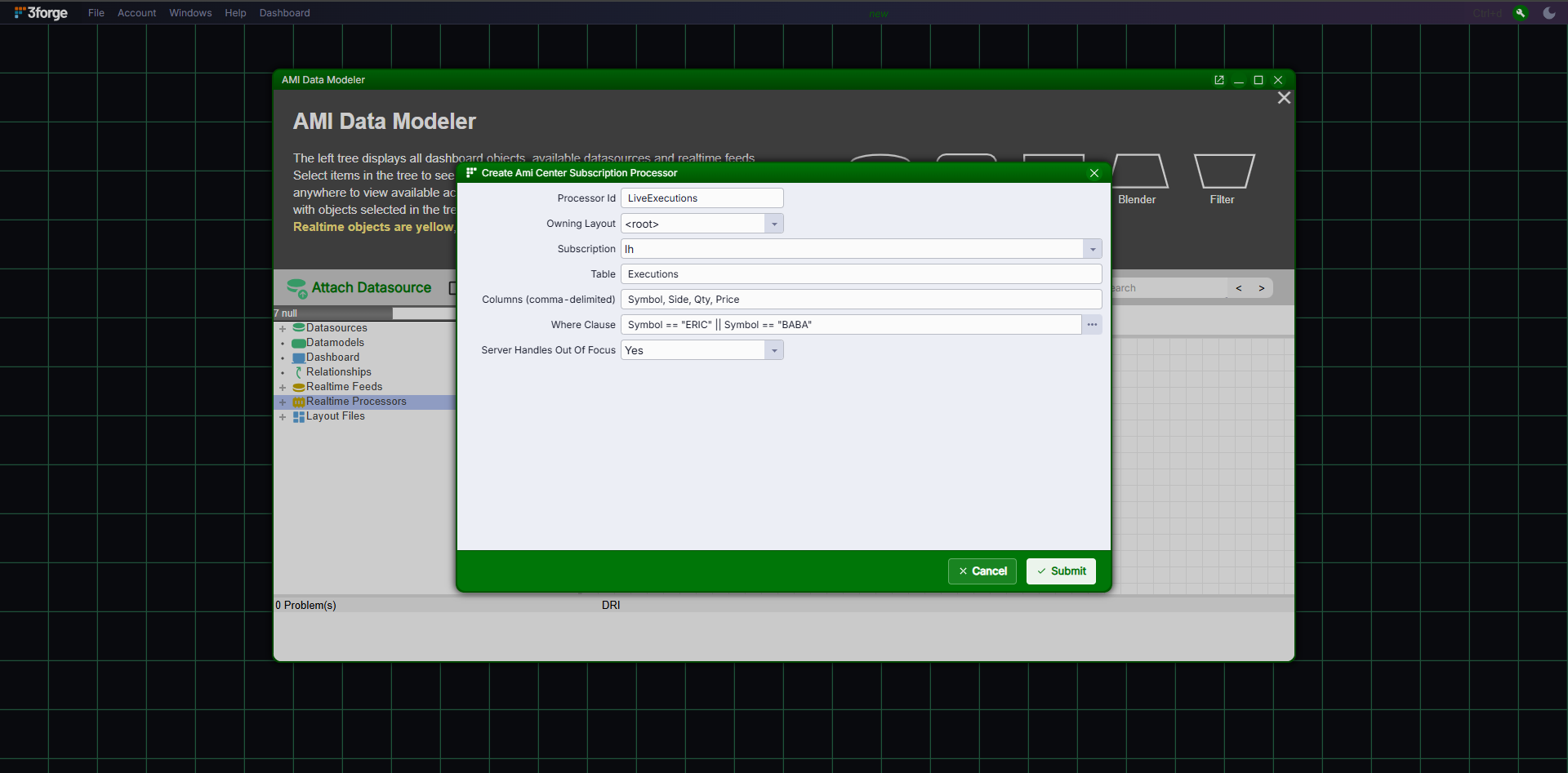
Complete the dialog with the values below, entering the table before the processor id, because entering the table replaces the processor id with the table name:
Field Value Notes Table ExecutionsThe Center table to subscribe to. Processor Id LiveExecutionsA unique name, shown in the object tree. The default, the table name, also works. Owning Layout <root>The default. Subscription lhThe endpoint name from ami.web.subscriptions.Columns (comma-delimited) Symbol,Side,Qty,PriceThe columns to stream. Where Clause The expression below AMI-expression syntax, evaluated at the Center. Server Handles Out Of Focus YesSee the out-of-focus flag under Subscription shape. Enter this expression in the "Where Clause" field:
-
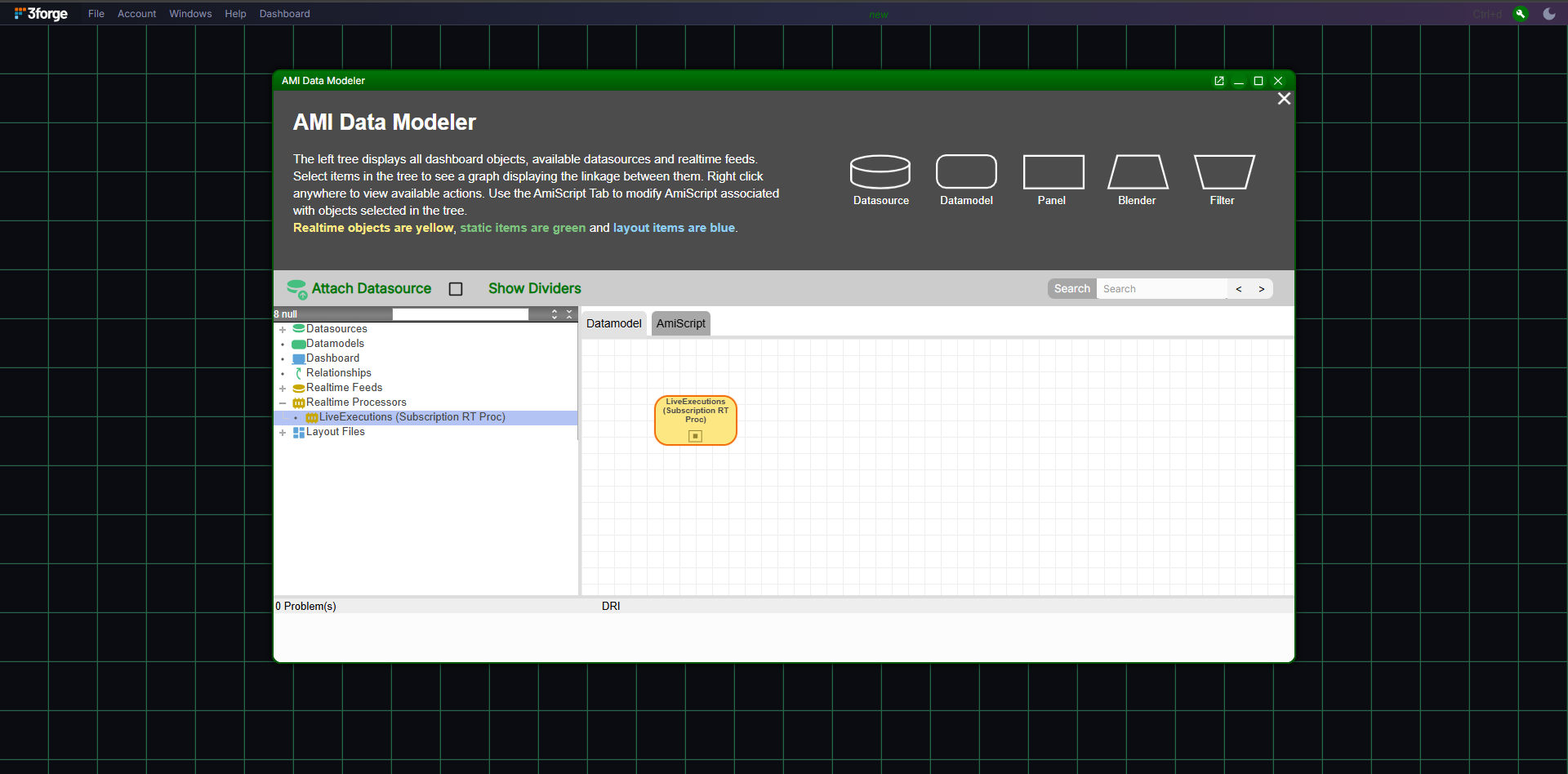
Click the "Submit" button. The processor appears under "Realtime Processors" in the object tree.
-
Right-click the processor and select "View Data".
Result
"View Data" lists the 3 ERIC and BABA rows from the sample table, with the 4 columns chosen. The processor is a realtime table that a Panel can show: right-click it and select "Add Realtime Table / Visualization".
Confirm on the Gateway
Confirm the subscription reached the Gateway with the route commands described in Routing:
showRouteSubscriptionslistsExecutionswith the filter, the 4 columns, and 3 rows.showClientSubscriptionslists the Web's subscription with the same filter and columns.
Troubleshooting
| Symptom | Cause |
|---|---|
The "Subscription" list has no lh entry |
ami.web.subscriptions is not set, or the Web was not restarted after setting it. |
| "View Data" shows 0 rows | The Gateway rejected the Web's login, so its subscription requests are refused. The Web log shows BAD_CREDENTIALS. Add the Web user to the Gateway's authentication source, then restart the Web. |
| "View Data" lists every row | The "Where Clause" field was empty when the processor was submitted. Right-click the processor, select "Edit processor", enter the expression, and click the "Submit" button. |
Using Gateway streaming over WebSocket
A WebSocket client subscribes through a Gateway by naming it in the connection path:
wss://host:3410/<gateway>, where <gateway> is the Gateway's component name. The subscription is
fanned out to the Gateway's Centers, and the merged result is streamed back. The WebSocket server runs
only when ami.websocket.port is set; see Data APIs → Configuration.
When the Gateway authenticates subscribers, which it does by default, the client must connect with HTTP
Basic credentials. These are forwarded as the Gateway login. With the WebSocket's own authentication
DISABLED, a connection without credentials opens, but a subscribe is answered with
subscribe failed: authentication required. With an authentication plugin set, the credentials must
first pass that plugin, and a connection without them is refused at the handshake with 401. A login
the Gateway refuses is reported as an error starting upstream:.
A browser sends credentials from the URL only when ami.websocket.auth.plugin.class names an
authentication plugin, so that the server challenges the connection. With the shipped DISABLED value, a
browser client cannot subscribe through an authenticating Gateway. See
WebSocket API → Authenticate.
What this does not support
- Subscriptions are over a single table. Joins are not supported.
- The
WHEREclause is AMI-expression syntax, not ANSI SQL.