Connect
This section covers every way to connect an application, a BI tool, or an agent to 3forge Enterprise: the Gateway for a single governed address, Data APIs for REST and WebSocket access, client libraries for Python and C++ programs, an ODBC driver for BI tools, and Excel RTD for live spreadsheet cells. To stream data into 3forge instead of out of it, see Relay, the data ingestion section.
Choosing a route
| Route | Use it when | Page |
|---|---|---|
| Gateway | You want one governed address in front of several Centers, with routing, JDBC, and streaming | Gateway |
| Data APIs (REST) | You need request/response SQL over HTTP, or a small set of diagnostic endpoints | REST API |
| Data APIs (WebSocket) | You need a live streaming subscription over a WebSocket connection | WebSocket streaming API |
| Client libraries (Python, C++) | You are wiring an existing trading, risk, or research program into the platform directly: SQL, live subscriptions, and publishing | Client libraries |
| ODBC driver | You need governed query access from Excel, Power BI, Tableau, or another ODBC-aware Windows application | ODBC driver |
| Excel RTD | You want live values pushed into individual Excel cells without polling | Excel RTD Server |
| Datasource adapters | You need the Center to query an external store on demand | Architecture |
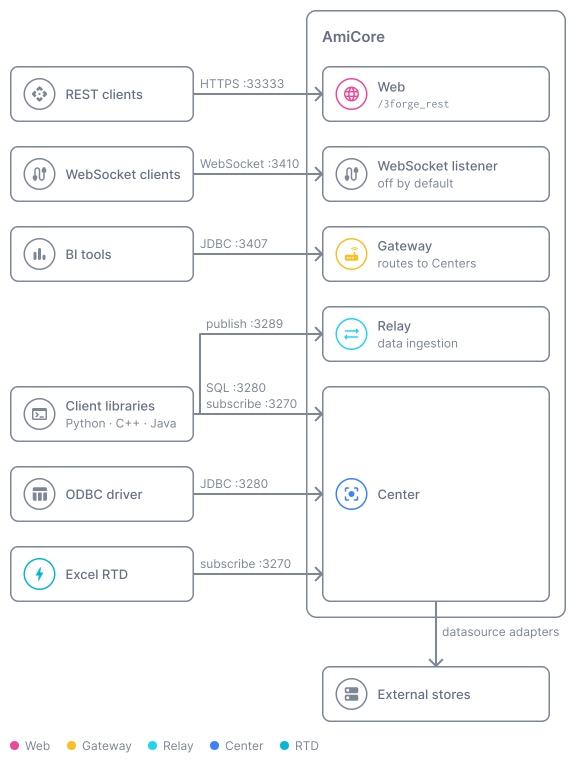
To stream continuous data into the Relay (feed handlers) or load a file directly into a Center table (LoadFile), see Relay instead, which covers data ingestion.
Most datasource adapters ship as separate plugins that are installed into the plugin directory rather than being bundled with the distribution.
Mutual TLS
The Center, JDBC, Relay, and Gateway listeners enforce mutual TLS whenever a keystore is configured: the client must present a certificate whose public key is registered on the server, or the connection is rejected at the handshake. The Python, ODBC, Excel RTD, and C++ clients all provision it the same way. Two listeners differ:
- REST API (HTTPS): server-side TLS only. It does not request a client certificate.
- WebSocket: requires a client certificate only when an authorized-clients file is also configured.
See Mutual TLS before provisioning any client.
Shared client behavior
The Python, ODBC, Excel RTD, and C++ clients are built on the same core, so several behaviors are identical across them:
- Failover: endpoints are tried in order, with exponential back-off between rounds.
- Autocommit only: there are no transactions.
- Mutual TLS: provisioned the same way, a client keypair whose
.publine is added to the server allowlist.
Sharding is the exception. The Python, C++, and Excel RTD clients shard across multiple independent servers per protocol, and JDBC reads broadcast to every shard in parallel and aggregate the rows. The ODBC driver connects to one server per connection, with failover endpoints only.
The AMI SQL dialect
AMI SQL differs from standard SQL. The differences you will hit most often:
| Standard SQL | AMI SQL |
|---|---|
= (equality) |
== |
'string' |
"string" (double quotes) |
LIKE 'p%' |
~~ "/^p.*/" |
SELECT DISTINCT … |
SELECT … GROUP BY … |
LIMIT n OFFSET m |
LIMIT m, n |
CAST(x AS INT) |
(INT)(x) |
NOW() |
timestamp() |
~~ is a filter match, not LIKE. Its wildcard is *, % and _ are ordinary characters, and by default the
match is partial and case-insensitive. A pattern written between slashes is a regular expression: ~~ "/^p.*/"
is anchored and case-sensitive, which is how LIKE 'p%' behaves.
Constraints are separate CREATE INDEX … USE CONSTRAINT=… statements rather than inline clauses; the SQLAlchemy dialect emits these automatically.