OpenFin
OpenFin Documentation
To start utilizing the integration features, you need to run this in the OpenFin workspace and include this in your local.properties file:
Variables
__OpenFin: You can see this in Dashboard > Session Variables.
Methods
raiseIntent(String intent, Map context)
-
Raises the specified intent with context, to be handled by another app.
broadcast(Map context)
-
Broadcasts context to all the other apps in workspace that are in the same color channel.
addIntentListener(String intentType)
-
This method adds an intent handler for the specified intent. You will need to have a corresponding entry in the intent section of the apps.json as well to indicate 3forge can handle the specified intent.
addContextListener(String context type)
-
This method qualifies 3forge to receive the specified context from a broadcast. Both the broadcaster and the receiver need to be in the same color channel.
bringToFront()
- This method brings the current 3forge window to the front of the OpenFin stack. This is different from 3forge's own bringToFront method.
setAsForeground()
- This method brings the 3forge window to the front.
sendNotification(Map options)
-
Sends a notification to the OpenFin workspace, available keys in the map are:
bodyTitle(required)bodyText(required)iconUrlcustomData, you may specify the data for each notification, to be used when user clicks on a buttonindicatorColor, must be of the following: red, green, yellow, blue, purple, grayindicatorTextbutton1title(required if adding buttons, see below for explanation)button1primarybutton1data
-
For adding button, use the format
button + number + title/data/primary/iconUrlwhere:number: corresponds to the ordering of the button. The lower the value, the more left the button appears e.g. if you have 3 buttons, the ordering will be 1 2 3.primary: indicates whether it will have the blue background color, this color cannot be changed.title: title of the button, required.iconUrl: image url for the button icon.data: custom data for each button.
-
Note that the maximum number of buttons is 8, per OpenFin.
-
Example configuration below creates 2 buttons:
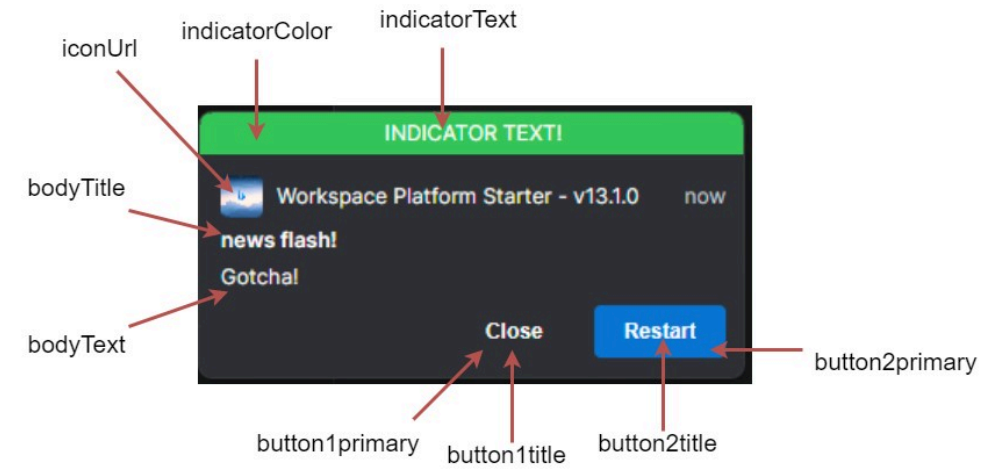
Callbacks
-
onRaiseIntent(Object intentResolution): triggered when 3forge receives an intentResolution or its result from raising the intent.- On fdc3 ver 2.0, if 3forge is able to get the result of the intentResolution, then you will receive the result, otherwise the intentResolution is returned.
- On fdc3 ver 1.2, it always returns the intentResolution.
-
onContext(Object context, Object metadata): triggered when 3forge receives a broadcast of a specific context.- You will need to set up a listener first to receive the specific context. See Supported AmiScript methods for an example.
-
onReceiveIntent(Object context): triggered when 3forge receives an intent from another app.- You will need to set up an intent listener first to trigger this. See Supported AmiScript methods for an example.
-
onNotificationAction(Object event): triggered when the user clicks on a button in the notification.-
You can use the following to parse the json into a map for ease of access
-
Below is a sample json structure that you will receive from the callback once the user clicks on the button:
-