AMI SQL: Datasource Access
This page covers the USE clause for accessing external datasources, query parameters, concurrent execution, AMIDB scope options, and escaping rules.
USE... Options
The USE key word allows users to specify which datasource the access clause should act on, as well as any other additional options the user can supply.
- There are a number of default options which can be overridden for a particular query. The general format is:
USE use_option=some_option. For example:
See the table below for a list of the different USE options available.
| Option | Description |
|---|---|
ds or datasource |
|
timeout |
|
limit |
|
string_template |
|
ds_url |
|
ds_username |
|
ds_password |
|
ds_password_enc |
|
ds_options |
|
ds_relay |
|
ds_adapter |
|
_custom |
|
USE...EXECUTE
This command enables you to "execute" code on an external datasource and process/store the results locally. This can be used to query datasources and must be formatted for the appropriate datasource.
The text passed into the EXECUTE command is sent directly to the datasource for execution. Therefore, variables cannot be referenced. Instead, substitution can be used (see String Templating).
Syntax
Example
Query Parameters
For more complex queries, it is possible to declare parameters after the initial query using AmiScript ? notation.
The general format of using placeholder parameters uses the following syntax:
Parameters can either be passed individually in the order of being called:
_p1=param1 _p2=param2 ... _pn=paramn
or as a list of parameters:
_paramList
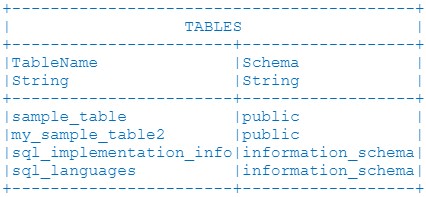
USE...SHOW TABLES
This command displays which tables are available on a given datasource. The resulting table output in the AMIDB Shell Tool will be called TABLE and contain two String columns: TableName and Schema.
Syntax
Example
-
This example will return a table displaying all tables available in the mydb datasource. If the datasource supports schema names, that will be populated as well.
Returns:
USE...INSERT
This command uploads data from AMI into a datasource.
The resulting table output in the AMIDB Shell Tool will be called Table and contain two String columns: TableName and Schema
Syntax
datasource_name: String name of the datasource containing the table to insert values intodatasource_table: Name of the table to insert values into
Examples
- This example will insert two rows into the mydb datasource's users table:
-
- This example copies all rows from AMI's my_users table into the "mydb" datasource's users table:
-
- This example copies all rows from the old_users table in the otherds datasource to the users table in the mydb datasource:
-
CONCURRENT{} and DISPATCH{} Blocks (advanced)
Deferred Statements
3forge supports asynchronous execution using deferred statements. These are AmiScript statements that can be paused, or "deferred," allowing AMI to pause the current state of the coroutine until a response is received. This allows AMI to process other queued AmiScript blocks instead of hanging for improved performance.
The access clause USE...EXECUTE is an example of an AmiScript deferred statement. It sends an executable query to an external datasource and pauses the AmiScript context until a response is received. Any additional logic depending on that response is also deferred.
Users can take advantage of deferred statements to run multiple queries simultaneously within a block of AmiScript. Using the CONCURRENT{...} and DISPATCH{...} key words in a block will cause all EXECUTE clauses within that block to run in parallel (instead of sequentially). This is particularly useful for querying multiple datasources.
The examples below compare how EXECUTE queries perform on 3 external datasources (mydb1, mydb2, mydb3), depending on whether concurrency is used.
Examples
The examples below compare the sequence of events and syntax of sequential execution and concurrent execution.
For these examples, we assume each query takes 2 seconds to execute (this does not necessarily reflect actual performance).
In sequential execution, each query is processed one after the other. The AmiScript state of each block will pause after execution while it waits for a response.
Assuming each query takes 2 seconds for a database to process, the first example will complete in about 6 seconds (2+2+2)
Sequence of Events
-
00:00:00 -
EXECUTEclause is sent to mydb1 -
00:00:00 - AmiScript block is paused until there is a response from mydb1...
-
00:00:02 - mytable1 is created (from result of query to mydb1)
-
00:00:02 -
EXECUTEclause is sent to mydb2 -
00:00:02 - AmiScript block is paused until there is a response from mydb2...
-
00:00:04 - mytable2 is created (from result of query to mydb2)
-
00:00:04 -
EXECUTEclause is sent to mydb3 -
00:00:04 - AmiScript block is paused until there is a response from mydb3...
-
00:00:06 - mytable3 is created (from result of query to mydb3)
-
00:00:06 - Block is complete after 6 seconds (code after the block will be executed)
For parallel or concurrent execution, each deferred statement (the EXECUTE query) is processed simultaneously.
Compared to the sequential (2+2+2), this example will complete in only 2 seconds:
Use the CONCURRENT keyword to mark a concurrent block, and then the keyword DISPATCH to coordinate each deferred statement.
In this case, all 3 EXECUTE queries will be initiated at the same time.
Sequence of Events
-
00:00:00 -
EXECUTEclause is sent to mydb1 -
00:00:00 -
EXECUTEclause is sent to mydb2 -
00:00:00 -
EXECUTEclause is sent to mydb3 -
00:00:00 - AmiScript task swaps until there is a response from all 3 queries...
-
00:00:02 - mytable1 is created (from result of query to mydb1)
-
00:00:02 - mytable2 is created (from result of query to mydb2)
-
00:00:02 - mytable3 is created (from result of query to mydb3)
-
00:00:02 - Block is complete after 2 seconds (code after the block will be executed)
AMIDB Scope Options
TEMPORARY
A table visible only to the user. It exists as long as the user session is active.
VARIABLE
A table created as an AMI Script Table object. It has the same scope and lifetime as a TEMPORARY table.
PUBLIC
A table which is visible to all users. Its definition (but not the content) persists. For persistent content see PersistEngine options.
If the scope is not specified, AMI will first check TEMPORARY tables, then VARIABLE tables, and lastly PUBLIC tables. Tables with identical names can exist in different scopes. However, if a PUBLIC table already exists, then it cannot be created again.
You may look at the DefinedBy column to see if a column is a variable or temporary.
Display
shows scoped tables
shows columns of scoped tables
shows column details of a scoped table
provides the command which can be used to create the scoped table
Schema Modification
CREATE
creates a scoped table
Examples
ALTER
modifies a scoped table
Examples
DROP
deletes a scoped table
Examples
RENAME
renames a scoped table
Examples
(All schema modification syntax options apply as in Schema and Data Modification)
Data Modification
INSERT
inserts row into scoped table
Examples
PREPARE
prepares additional columns on scoped table
ANALYZE
runs analysis on scoped table
Examples
SYNC
syncs scoped table to ProjectingClause result
- Rows in source not in target -> inserted
- Rows in target not in source -> deleted
- Rows present in both (matched via
ONkeys) -> updated
Note
ON (key_columns) specifies which columns identify a row for matching. Without ON, AMI cannot match rows and will fall back to full replace (equivalent to TRUNCATE + INSERT).
Example
TRUNCATE
deletes all rows from scoped table
(All data modification syntax options apply as in Schema and Data Modification)
Query Clauses
SELECT
queries scoped table
Examples
UPDATE
updates scoped table
Examples
DELETE FROM
deletes data from scoped table
Examples
(All query clauses syntax options apply as in SQL Querying)
AMI-SQL Escaping Rules
If you want to use a reserve keyword as your table name, such as order,limit, you need to use backtick ` to escape it.