String Templating
This page covers string templating syntax, simplified text matching, embedding external languages, and timestamp formatting in AmiScript.
Simplified Text Matching
Overview
The simplified text matching finds text entries using a simple pattern. When included in AmiScript, it takes the form: var ~~ "my pattern"
Rule 1, the general case: The pattern supplied will match any text that contains the pattern, case insensitive. For example, assuming word is a variable let's consider the expression: word ~~ "AB". This will return true if word is cab or ABC or tabs but will return false if word is apple.
Rule 2, special symbols: If you need to look for symbols besides letters, numbers or white space, prefix with a back slash. For example, to look for the word P&L, the expression is word ~~ "P\\&L". Remember, we are in a string so a double back slash evaluates to a single backslash. Note this includes the following list of symbols: *^$.[]()\\|&!?:
Rule 3, Additional syntax: There are many special symbols that can be used for more advanced searches, for example the star (*) means anything, so "f*r" will match any thing that has an f followed by r, such as 3FORGE. See the following sections for more advanced syntax.
Syntax: The following syntaxes are used to do "basic" matching against expressions with some text.
-
Simple Matching Expression
Matches any text that contains the supplied pattern regardless of case. The following characters are reserved and may be embedded in the expression:
*- Anything: Can be expanded to include any text.^- Starts With: Symbolizes the "start" of the text. In other words, if an expression starts with^, then the text must start with the following expression. Please note that carets (^) not at the start of the expression will be treated as literals. (When used in conjunction with the tilde (~), the hat should follow the tilde.)$- Ends With: Symbolizes the "end" of the text. In other words, if an expression ends with a dollar sign($) then the text must end with the preceding expression. Please note that dollar signs not at the end of the expression will be treated as literals..- Any single char.: each dot will disregard one character and checks for the target character(s) in the remaining string, case INsensitive.
Examples:
.s: Disregards the first character, checks for "s" OR "S" in the remaining string;s.: Attempts to find "s" OR "S" in the string. If found, disregards the next character and returns a match. If not found, returns empty;..s: Disregards the first TWO characters, checks for "s" OR "S" in the remaining string. Return a match if "s" OR "S" is found, empty otherwise;ss..: Attempts to find "ss" OR either one of ("sS", "SS", "Ss") (must be consecutive "s") in the string. When found, disregards the next two characters and returns a match;..s.S..: Disregards the first TWO characters, attempts to find one "s" OR "S", if found, disregard the next character, then attempts to find another "s" OR "S" in the remaining string, if found, disregards the next two characters and returns a match. If "s" was not found in either one of the two scenarios, return empty.- Note that the evaluation order is always from left to right. Each character is checked at most once.
[charlist]Any of Chars.: Match any one of the characters enclosed within the brackets.~: Case Sensitive. Apply it before the first character. It indicates case sensitivity when matching the string.- Escaped chars: When referencing the following characters literally, they must be escaped with a back slash (
\):\*\^\$.\[\]()\~\|&!?: - Literals: Letter-for-letter matches to the expression.
-
'Exact Expression'Matches the exact expression supplied in quotes (other than an escaped quote using \ ). This would be similar to using an equals ( == ).
-
/regex/<options>/This will use the java.util.regex package to match against regular expressions (see the java.util.regex.Pattern for details on building regular expressions). The
<options>allow you to control behavior of how the regular expression operates. Simply supply the options you would like to apply in a continuous string between the 2nd and last forward slash (/). The following options are supported:- q - Canonical Equivalence: When this flag is specified, two characters will be considered to match if and only if their full canonical decompositions match. The expression "a\u030A", for example, will match the string "?" when this flag is specified. By default, matching does not take canonical equivalence into account.
- f - Full Line: When this flag is specified, the text must fully match the regular expression. If this option is not specified, any portion of the text matching the expression will be considered a match.
- i - Case Insensitive: By default, case-insensitive matching assumes that only characters in the US-ASCII charset are being matched. Unicode-aware case-insensitive matching can be enabled by specifying the u (Unicode case) flag in conjunction with this flag.
- c - Comments: White space is ignored, and embedded comments starting with # are ignored until the end of a line.
- l - Literal: White space is ignored, and embedded comments starting with # are ignored until the end of a line.
- d - Disable Dot All: If the disable dot all flag is set then the dot expression (.) will match any character except a line terminator. By default, the dot expression only matches line terminators.
- m - Multiline: In multiline mode the expressions ^ and $ match just after or just before, respectively, a line terminator or the end of the input sequence. By default, these expressions only match at the beginning and the end of the entire input sequence.
- u - unicode Case: When this flag is specified, case-insensitive matching, enabled by the i (case insensitive) flag, is done in a manner consistent with the Unicode Standard. By default, case-insensitive matching assumes that only characters in the US-ASCII charset are being matched.
- x - Unix Lines: In this mode, only the '\n' line terminator is recognized in the behavior of ., ^, and $.
- v - Not Matching: Reverses the matching result. Expressions that normally would match will not match and expressions that would not normally match will match.
- n - No Error: If the regular expression is invalid do not throw an exception, instead just always return false, unless the v flag is also set, in which case always return true.
-
<null>Null String - providing null will result in a matcher which matches nothing.
-
<Empty String>Providing an empty (zero length) string to the Matcher method will result in a matcher which matches only the empty string.
Conjugated Syntaxes
The following syntaxes allow for more complicated pattern matching. Nested syntaxes may also be conjugated syntaxes. For nested syntaxes which are basic syntaxes open parenthesis [ ( ] and close parenthesis [ ) ] must be escaped with a backslash [ \ ].
-
(Expression): The parenthesis can be used to force order of operations, important when mixing or [ | ] and and [ & ] clauses. -
Expression1\|Expression2: If either of the nested expressions match this expression will return true. -
Expression1&Expression2: If both of the nested expressions match this expression will return true. -
!Expression: Inverts the result of the expression. -
(Expression) ? (ExpressionTrue) : (ExpressionFalse): If the Expression matches, return result of ExpressionTrue Otherwise return result of ExpressionFalse.
Sample Expressions
| Expression | Examples Match | Examples Mismatch | Comments |
|---|---|---|---|
FORG |
3Forge |
Frg |
Partial text, Case insensitive match |
~FORG |
FORGE |
forge |
Partial text, Case sensitive match |
^FORG$ |
FORG |
FORGE |
Exact text, Case insensitive match |
~^Forge$ |
Forge |
forge |
Exact text, Case sensitive match |
!FORG |
3FOR |
3FORGE |
Escape partial text, case insensitive |
!^FORG$ |
FORGE |
FORG |
Escape exact text, case insensitive |
[RB]ob |
Bobby |
lob |
Using char list |
[A-Z]ob |
mob |
7ob |
Char list range |
3F*ge |
3Forge llc |
Forge llc |
Wild chars |
3f.ge |
3Frge |
3Forge llc |
Match single char |
Acme llc. |
Acme llc. |
Acme llcc |
Escaping special chars |
Rob|bob|dan |
robert |
ted |
Or clause partial match |
^Rob$|^Dan$ |
rob |
robert |
Or clause, exact match |
bob&rob |
robob |
bobob |
And clause partial |
'Exact' |
Exact |
exact |
Exact case sensitive text match |
a |
Empty string, only matches empty string | ||
a?bb:s |
Abba |
acca |
''If contains 'a', must contain 'bb' |
a?bb:s |
test |
tent |
''If doesn't contain 'a', must contain 's' |
(a|b)&(e|f) |
af |
ab |
Must contain a or b. Also must contain e or f |
'abc'|'def' |
def |
DEF |
Must be exactly 'abc' or 'def' |
/reg/ |
regular |
Regular |
By default, regex must be case sensitive |
/reg/i/ |
Regular |
whatever |
I option makes case insensitive |
/req//|3F |
3F |
3Forge |
Mixing regex and non regex |
/req//|3F |
reg |
Regular |
Mixing regex and non regex |
String Templating
Goals
String templating is used to ease the dynamic creation of strings. Some key places that benefit from string templating:
- HTML generation
- SQL generation
- Content-rich messages for the end user
- Debugging / Logging
Basic Usage
As usual, strings are denoted using double quotes at the beginning and end, ex: "...". Within a string, ${...} is recognized as a special operator. The text between the curly braces is interpreted as code to be executed. For example, the code can be a simple variable name, or a complex set of expressions.
If you wish to include a literal dollar sign followed by a curly bracket, the dollar sign must be escaped with a backslash.
To prevent against SQL (and other forms) of injections, ${...} wrapped with quotes ('), double quotes (") or back ticks (`) will cause the evaluated text to be escaped with a backslash (\) accordingly:
For example:
Finally, null will evaluate to an empty string "".
Examples
Templated Flow Control
The ${...} syntax can also be used to dictate if/how text should be included. This includes all flow control statements, including if-statements, for-loops, for-each-loops, and while-loops. All flow control statements are closed by the ${} token (empty curly brackets).
Flow Control Statement
Note: Definition is a multiline string for clarity.
Single Line Flow Control Statement
Examples:
For if/else use the reserved ${else} token:
If/else Statements
Note: Definition is a multiline string for clarity.
Single Line If/else Statements
Example:
"Count the apples: ${if(5 < 3)} apple ${else} orange ${} There is one orange."
Flow control statements can be nested:
Nested Flow Control Statements
Note: Definition is a multiline string for clarity.
Single Line Nested Flow Control Statements
Example:
Examples
Syntax for Embedding External Languages
Goals
- Allow users familiar with other languages to embed familiar code into existing data models.
- Enable users to take advantage of existing libraries found in other languages
Syntax
Rules on Prefixing and terminating the custom code segment:
- The prefix must be at least 2 consecutive opening curly brackets (
{) - The termination must have the same number of closing curly brackets (
}) as the prefix has - You can not include the suffix inside the embedded code. So for example, let's say you have a
}}inside the embedded code, then you should wrap the embedded code in three curly brackets, ex: {{{custom_code_witha_double_curlys}}} - The embedded code is evaluated literally, ex: all escapes, etc. are sent directly to the sub-language engine
Currently, python is supported out of the box.
Example
Formatting Timestamps
3forge provides two ways of handling timestamps when it comes to formatting:
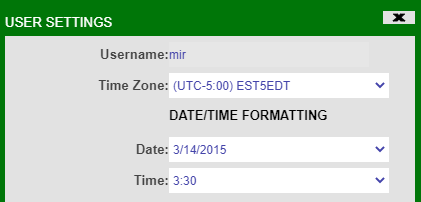
- User Settings: If you like to maintain a unified date/time format across the dashboard, the formatting can be configured via user settings. Simply navigate to Account -> My Settings.
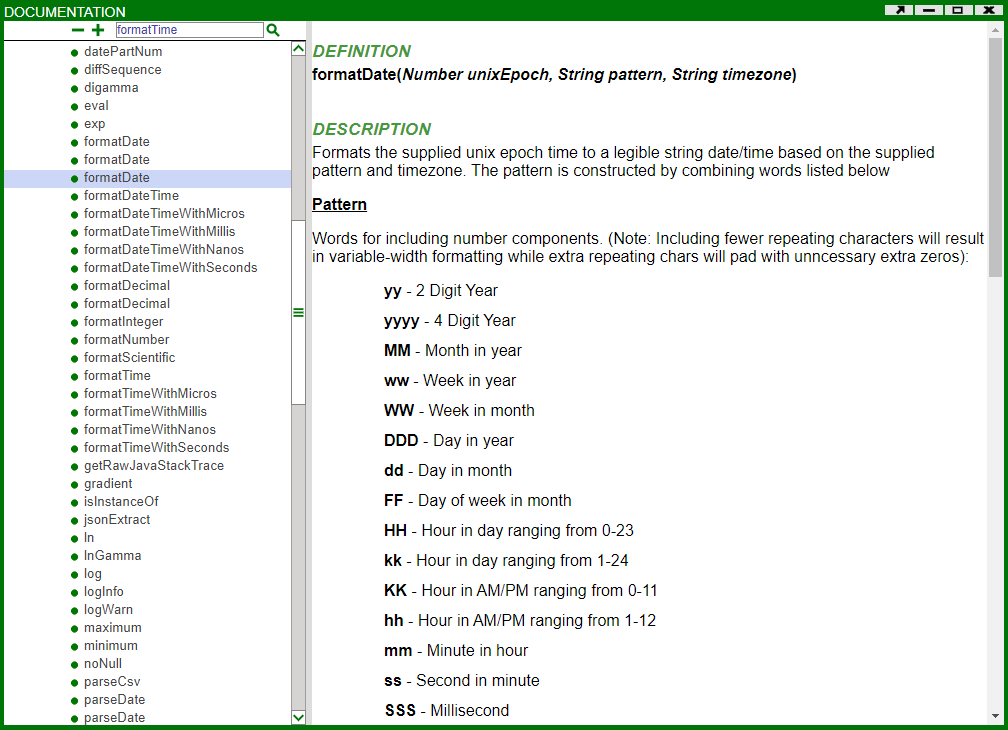
- AmiScript Methods: If you like to have different formats in different places in the dashboard, AmiScript provides a handful of methods that can be utilized. To know more about their usage you can navigate to Help -> AmiScript Doc and the relevant methods will be available under AMI-Script Functions.
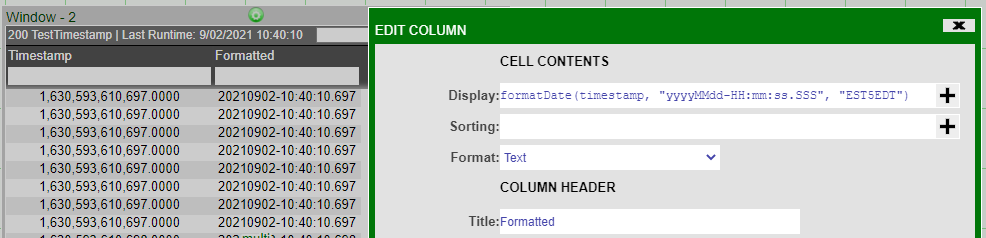
An example is provided below where an AmiScript Method has been used to format a table column.
Additionally, You can set the default timezone for all users by setting the property in local.properties: