AmiScript Language Reference
This page covers AmiScript language fundamentals: variables, types, operators, flow control, objects, and built-in constants.
Overview
AmiScript uses a single parse-compile-evaluate pipeline shared across its three language layers: the procedural scripting language, the embedded SQL extension, and the string templating system. When AmiScript runs, expressions are first parsed into an abstract syntax tree, then compiled into a typed, bound representation. Type checking, method resolution, and SQL query planning all happen at compile time, before any evaluation occurs. The compiled form is cached and reused across subsequent evaluations.
The language runs in two distinct environments. In the Web, AmiScript executes in the context of a user Session and has access to session state, UI callbacks, and Dashboard variables. In the Center, it executes in the context of a datamodel or trigger and has access to in-memory tables, stored procedures, and scheduled timers. Some built-in objects and methods are available only in one environment.
Examples
Syntax
Same support as Java for control structures like loops, if/else statements, white space, comments and expressions:
Data Structures
General purpose list, map, set & table data structures are provided. The constructors can be used to pre-populate data:
There is additional Python-like support for some structures such as lists and maps. List elements can be accessed with square brackets like in Python and incremented:
Access nested elements in Maps using square brackets (previously only accessible via jsonPath())
Type Safety & Coercion
Type names are case insensitive, e.g: double and DOUBLE are the same.
Other examples:
- int and integer are the same
- char and character are the same
All types support null value. Dereferencing null, results in null. Expressions with null result in null.
Flexible type coercion. When coercion is not possible, the value is coerced to null.
All types extend the AmiScript class Object and casting is not necessary for assignment.
All types can be thrown/caught and all blocks can have catch clauses (try key word is not necessary).
String Templates
If strings contain a ${...}, the content of the curly brackets is interpreted.
String Template Example
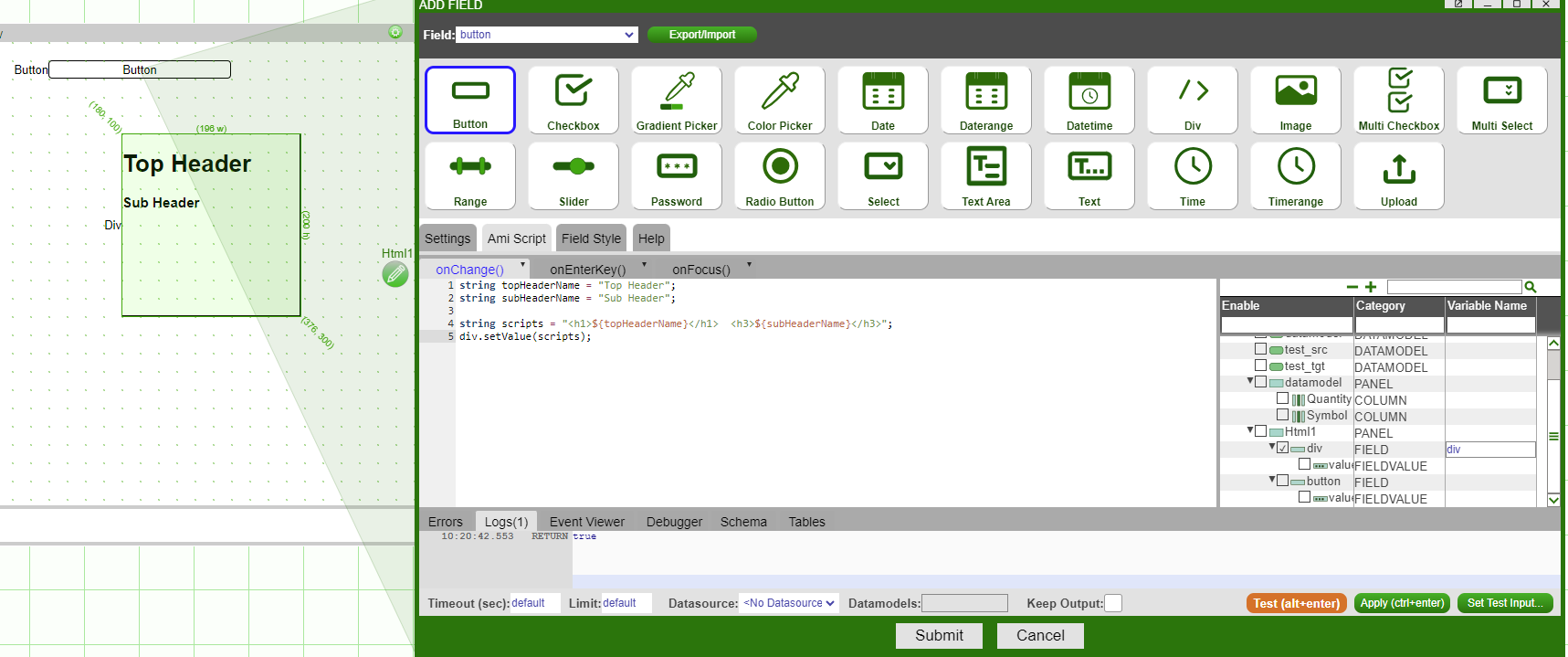
This example uses string templates to access and evaluate variables from AmiScript and pass them to a div field:
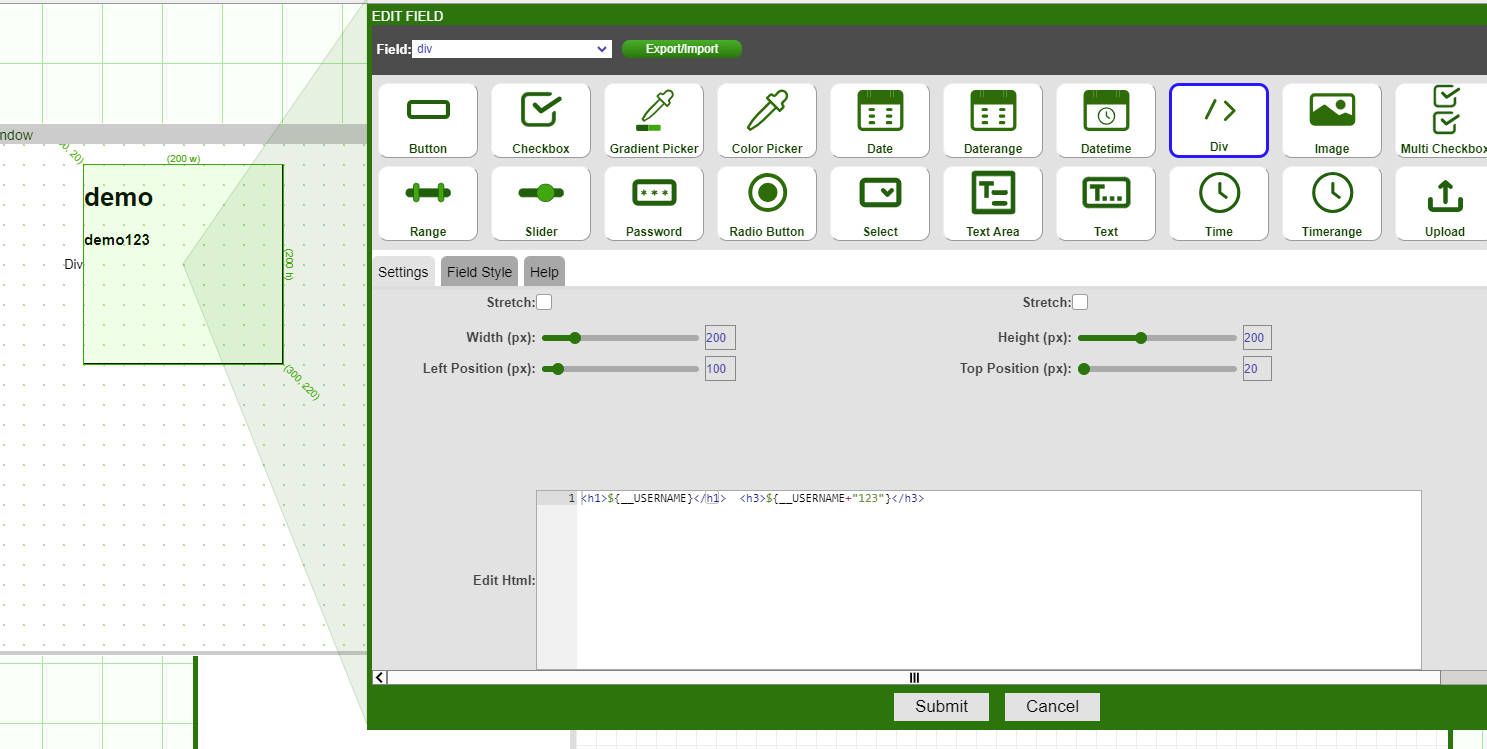
Alternatively, use string template inside the div field:
Use triple quotes for literals:
SQL
There are several reserved words that indicate an SQL statement, including CREATE, SELECT, INSERT, DELETE, etc.
Variables and templates can be used inside SQL:
Table coercion works for Table cells to Objects, Columns to Lists, and Rows to Maps.
To query external data sources run the USE ds= ... EXECUTE command:
To upload data to external data sources, run the USE ds= ... INSERT command:
Custom Methods
Methods are static and must return a type. If a return clause is not reached, the function returns the value of the last statement.
Variable Naming
Variables are named containers for storing data in AMI. Like other object oriented programming languages, variables are typed (but all are derived from Objects) and are unique, case-sensitive combinations of the following characters:
- a-z
- A-Z
- _
- 0-9
where the first character must not be a number. For example, int some_int1 = 0;.
Alternatively, variables can be wrapped in back ticks (`), in which case all characters are supported, allowing for accessibility with external language references, or for using protected class names. For example:
int `integer` = 0;int `#001` = 1;
Variables are declared with the following syntax (the value will default to null if an expression is not supplied):
Literals (Constants)
| digits | Int constant |
| 0xdigits | Hex Int constant |
| 0digits | Octal Int constant |
| digitsL | Long constant |
| 0xdigitsL | Hex long constant |
| 0digitsL | Octal long constant |
| digits.digits | Float constant. Note, scientific (aka 'E') notation is supported |
| digits.digitsD | Double constant. Note, scientific (aka 'E') notation is supported |
| "chars" | String constant. Use backslash (\ to escape quotes, backslash (\) and other control chars, ex: \n. A string can be defined over multiple lines using a trailing backslash on all but the last line, note that preceding white space is trimmed out for subsequent lines. Please see String Templating for details on \${...} syntax |
| \n\r\t |
White space (token delimiter) |
Reserved Type
All reserved types' values are immutable. Null is a valid value.
| Long | 64 bit signed whole number |
| Double | 64 bit signed float |
| String | Variable length string of UTF 8 characters |
| Integer | 32 bit signed whole number |
| Float | 32 bit signed float |
| Byte | 8 bit signed whole number |
| Boolean | boolean (true or false) |
| Number | Base class for Long,Double,Integer,Float,Byte |
| UTC | Timestamp with millisecond precision (since unix epoch) |
Examples
Casting
Variables are strongly typed, but casting can be explicit or implicit. If a cast fails, the result evaluates to null. Also, equality operations (==, <=, >=, >, <, !=) will also auto-cast when possible as well.
Examples
Variable Scoping
Scopes are defined using statement blocks, which are denoted by curly brackets: {...}. Within a statement block, variables are only visible after they are declared. When statement blocks are nested inside other statement blocks, all variables declared in the outer block are visible within the inner block as long as the variable is declared before the inner block. A variable in the same scope cannot be re-declared when another variable with the same name is visible.
Examples
Standard Operators
The operators below are ordered by significance.
math_expressions
(evaluates to num_int_expr type)
| num_expr | * | num_expr | multiplication |
| num_expr | / | num_expr | division |
| num_expr | % | num_expr | modulus (remainder) |
| num_expr | + | num_expr | addition for numbers |
| num_expr | - | num_expr | subtraction |
binary_expressions
(evaluates to num_int_expr type)
| int_expr | ~ | int_expr | bitwise NOT |
| int_expr | << | int_expr | signed bit shift left |
| int_expr | >> | int_expr | signed bit shift right |
| int_expr | >>> | int_expr | unsigned bit shift right |
| int_expr | & | int_expr | bitwise AND |
| int_expr | ^ | int_expr | bitwise XOR |
| int_expr | ! | int_expr | bitwise OR |
boolean_expressions
(evaluates to boolean)
| ! | bool_expr | boolean (logical) NOT | |
| expr | < | expr | less than (strings are case sensitive) |
| expr | > | expr | greater than (strings are case sensitive) |
| expr | <= | expr | less than or equal to (strings are case sensitive) |
| expr | >= | expr | greater than or equal to (strings are case sensitive) |
| expr | == | expr | equal to (strings are case sensitive) |
| expr | != | expr | is not equal to (strings are case sensitive) |
| expr | =~ | regex | matches regular expression (see Java Pattern for details) |
| expr | !~ | regex | does not match regular expression (see Java Pattern for details) |
| expr | ~~ | simple_pattern | simplified text matching. See Simplified Text Matching section. |
| expr | && | expr | logical and. Short circuits if left expr returns false. Short circuits if right expr is const and false |
| expr | || | expr | logical or. Short circuits if left expr returns true. Short circuits if right expr is const and true |
string_expressions
(evaluates to boolean)
| string_expr + expr | String concatenation. Null values equate to empty string ("") |
special_expressions
| (expression) | Force Order of operations |
| (type)statement | Explicit cast to type. Note that a failed cast returns null. Also, casting is automatic, so it's not necessary |
| bool_expr ? tr_expr : fl_expr | If bool_expr returns true, then evaluates to tr_expr, otherwise evaluates to fl_expr. |
Examples
Assignment & Declaration
special
(evaluates to type)
| new type(param[, param ...]) | Object Creation |
| type var_name | Variable declaration (Value is defaulted to null) |
| type var_name = expression | Variable declaration and assignment |
| Variable declaration and assignment | Variable declaration and assignment |
assignment (evaluates to num_var type)
| num_var | ++ | combined post-increment assignment | |
| ++ | num_var | combined pre-increment assignment | |
| num_var | -- | combined post-decrement assignment | |
| -- | num_var | combined pre-decrement assignment | |
| num_var | *= | num_expr | combined multiplication assignment |
| num_var | /= | num_expr | combined division assignment |
| num_var | %= | num_expr | combined modulus assignment (remainder) |
| num_var | += | num_expr | combined addition assignment |
| num_var | -= | num_expr | combined subtraction assignment |
Flow Control
Complex AMI scripts can be achieved by combining multiple statements into statement blocks. A statement block is wrapped in curly brackets {...} and each statement is separated with a semi-colon;. Then, the execution of statement blocks can be determined using a variety of flow control statements including if, if/else, for, while, and for-each-loops. Note that for and while loops can use the continue and break directives as well.
Examples
statement block
Evaluates to return value if a return_statement exists, otherwise it evaluates to the last statement's evaluation. If no statements, evaluates to Void
for loop
initialization: Statement that is called first, used to declare variables with local scope.
termination_expression: Statement that must evaluate to boolean, false terminates.
increment: Statement called after each completion of the loop's statements.
statement: Called once per loop. Note:
- continue_statement will exit the statement and proceed to increment statement
- break_statement will exit the for loop entirely
Evaluates to Void.
for each loop
iterable_or_array: Values to iterate over in order.
statement: called once per loop. Note:
- continue_statement will exit the statement and proceed to increment statement
- break_statement will exit the for loop entirely
Evaluates to Void.
while loop
Same as for(;bool_expression;) statement.
Evaluates to Void.
if statement
If bool_expression evaluates to true then execute statement.
Evaluates to Void.
if else statement
If bool_expression evaluates to true then execute statement otherwise execute statement2.
Evaluates to Void.
return statement
Evaluates to statement's value. Will cause call stack to be popped out to caller function.
break statement
See for_loop, for_each_loop and while_loop.
continue statement
See for_loop, for_each_loop and while_loop.
function call
Evaluates to return_type value.
member method call
Evaluates to return_type value.
Objects
There is a predefined set of object types (classes).
These are used to facilitate the interaction between AmiScript and various backend components, user inputs, dashboards, etc. Additionally, data structures are represented as objects and can be instantiated using the new operator.
Objects can only be accessed via methods (not member variables).
The Session Object
session: Each user that is logged in has a session object (which is of type Session). This is the "starting point" for access to the user's information, along with various dashboard components.
Attributes and Class Methods for a Session Object
-
Session values: A hash map that stores user defined variables in the format of
Variable_name_key=variable_value. Initially, it is an empty map:session.setValue(string key, object value)session.getValue(string key)session.getValues()
-
Session variables: A list of variables that are predefined by dashboard and Web server. They can be viewed from Dashboard -> Session Variables.
The dashboard editor can also define custom session variables by clicking Add Variable. These are saved as part of the dashboard layout file:
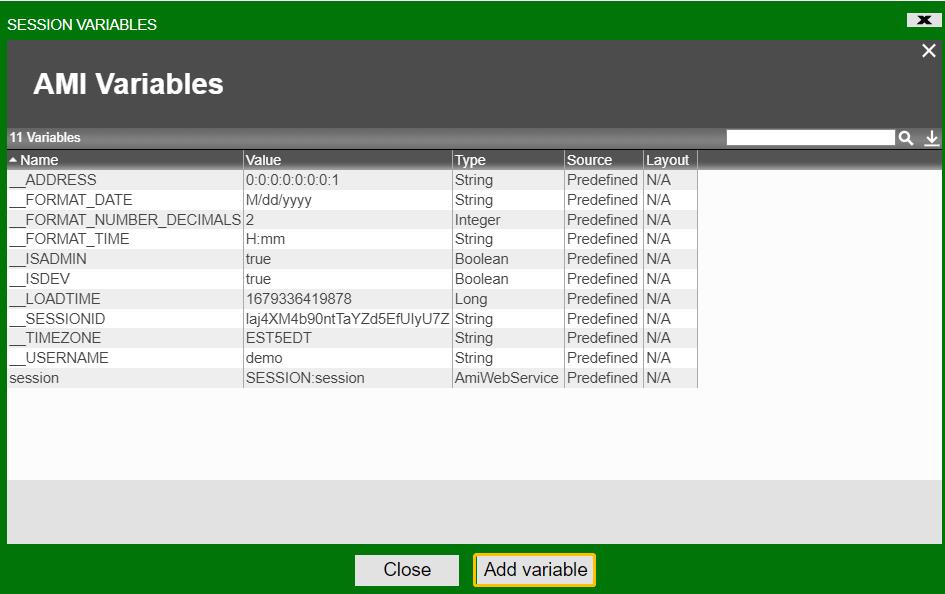
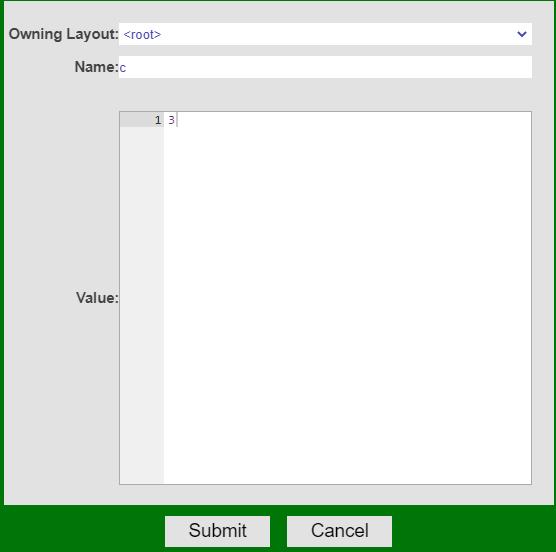
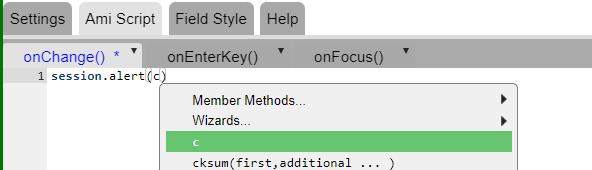
Now this variable that we just defined is accessible everywhere in the current session.
-
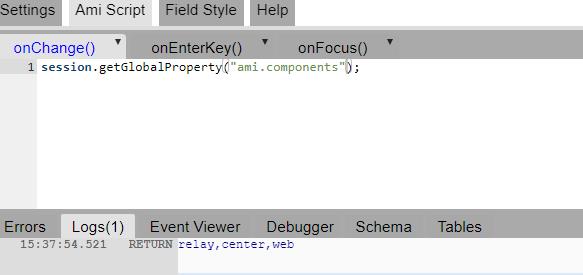
Session global properties: These are server properties defined in the
default.properties,local.propertiesand all other properties files.- session.getGlobalProperty(string propertyKey)
-
Session Properties: Another way to access session variables:
Common Data Structures
List: A zero-indexed ArrayList implementation.
Set: A set of unique values.
Map: A Linked Hash Map implementation.
Table: A 2-dimensional table with the same characteristics as a SQL style table. Tables have a title. Columns are named and strongly typed.
Tableset: A map of tables. Can be loosely thought of as a mini database.
Examples
Commenting
Commenting is identical to the commenting syntax in Java & C++.
There are two types of comments: single-line and multi-line.
Single-line syntax
Multi-line syntax
Tip
To comment/uncomment out blocks of code for debugging or other purposes, select the code-block and use the keyboard shortcut CTRL + /.
AmiScript Constants
AmiScript can reference constants just like other variables. Note the constant's values cannot be changed using AmiScript.
The standard naming convention for global variables is 2 under bars (__) followed by an all uppercase name.
Constants can be defined in three ways:
-
At the server level (via a config file loaded at startup, typically
local.properties):-
Typically the syntax is:
amiscript.variable.varname=value -
If the value is a string, is must be surrounded in double quotes, see literals for details
-
For example, this could reside in your
local.properties:
-
-
At the user level (using an authentication plugin, or the
access.txtfile):-
Typically the syntax is:
{=html}amiscript.variable.varname=value -
If the value is a string, is must be surrounded in double quotes, see literals for details
-
For example, this could reside in your
access.txtfile for user "demo" (with password demo123):
-
-
There are also pre-determined variables defined by the AMI Web system:
__USERNAME: (String) the username of the logged in user.__SESSIONID: (String) a unique id for the Web session.__TIMEZONE: (String) the timezone of the user's session.__ADDRESS: (String) the ip address of the user's browser.__LOADTIME: (Long) the time in milliseconds that the user started the session.session: (Session) the session object representing the user's session.
Tip
Through the front end in editor mode you can view all declared constants via: Menu Bar -> Dashboard -> Session Variables.
AMI Reserved Words (alphabetical)
ADD ALTER ANALYZE AND AS ASC BEFORE BINARY BOOLEAN BREAK BY BYNAME CALL CASE CATCH CREATE COLUMN CONCURRENT CONTINUE DEFAULT DELETE DESC DESCRIBE DIAGNOSE DISABLE DO DOUBLE DROP ELSE ENABLE EXCEPT EXECUTE EXTERN FLOAT FOR FROM GROUP HAVING IF IN INDEX INSERT INT INTEGER INTO JOIN LEFT LIMIT LOCAL LONG METHOD MODIFY NEAREST NEW NOT OFTYPE ON ONLY OR ORDER OUTER PARTITION PREPARE PRIORITY PROCEDURE PUBLIC RENAME RETURN RIGHT SELECT SET SHOW STEP STRING SWITCH SYNC TABLE TABLES TEMPORARY TIMER TRIGGER TO TRUNCATE UNION UNPACK UPDATE USE UTC UTCN VALUES WHERE WHILE WINDOW
Reserved words are case insensitive